A budget can look great at the beginning of the month.
Then real life happens.
Groceries cost more than expected. A subscription renews. A utility bill changes. One small online order turns into three. By the end of the month, your budget may not look anything like the plan you started with.
That does not mean you failed.
A monthly budget reset routine helps you review what actually happened, fix weak spots, reset your categories, and prepare for the next month with better information. This is general budgeting education, not professional financial advice. The examples below are for education only, so adjust the numbers based on your own income, bills, debt, and basic needs.
Quick Answer: What Is a Monthly Budget Reset Routine?
A monthly budget reset routine is a short review you do at the end or beginning of each month to check spending, bills, subscriptions, savings, debt, and budget categories.
The goal is not to create a perfect budget. It is to use last month’s real numbers to reset your budget and make the next month more realistic.
Why Your Budget Needs a Monthly Reset
A budget is not a fixed document. It should change when real life changes.
Your bills may shift. Groceries may cost more. A birthday, school fee, car repair, holiday, or annual subscription can throw off a budget that looked fine on paper.
That is why a monthly budget reset matters.
It gives you a chance to pause and ask:
- What actually happened last month?
- Which categories went over?
- Which bills are coming next month?
- What needs to change before the new month starts?
Your budget does not fail because one month was messy. It fails when you never adjust it.
A monthly reset helps your budget become more realistic instead of more restrictive.
Free Printable
Monthly Budget Reset Checklist PDF
Use this printable checklist to review last month, reset your budget categories, check bills, and plan the new month with more clarity.
Download Free PDF ChecklistWhen to Do an End-of-Month Budget Reset
The best time to do a monthly money reset is usually two or three days before the new month begins.
That gives you enough time to review the old month and prepare for the next one before new bills, groceries, and spending start again.
You can also do it:
- On the last Sunday of the month
- On the last weekday of the month
- On the first morning of the new month
- After your major bills have cleared
Think of this as your money reset window. It is a short block of time when you review the old month and prepare the next one. It does not need to take hours.
Even 20–30 minutes can make your next budget feel more organized. Instead of fixing your money randomly, build a monthly financial routine that helps you review everything clearly.
How to Know What Kind of Reset This Month Actually Needs
Not every month needs the same reset.
A month where three categories went over budget, a subscription renewed unexpectedly, and income was lower than usual needs a fundamentally different reset from a month where spending was close to plan and no surprises appeared.
Treating every reset the same way creates a different problem: on smooth months, the full process feels heavier than it needs to be. When the routine consistently feels heavier than necessary, people start skipping it — and the months that genuinely need a full reset go unreviewed.
Before opening the RESET Method below, spend two minutes reading your last month’s data with one question in mind:
How many categories went over budget, and by how much?
That single answer is usually enough to calibrate the kind of reset this month needs.
If zero or one category went slightly over: This month needs a maintenance check, not a full reset. Confirm bills for the new month, check whether any subscriptions renewed, and update the one category that drifted. The rest of the budget is working. Do not rebuild what is not broken.
If two or three categories went over, or one went significantly over: This month needs a targeted reset. Focus the RESET Method on the specific categories that drifted, check whether any irregular expenses are coming next month, and update savings or debt goals if they were affected. Skip the steps that apply to categories that ran normally.
If four or more categories went over, or the month felt financially chaotic: This month needs a full reset. Run the entire RESET Method. The budget may need structural changes — not just category adjustments — and skipping steps risks repeating the same pattern next month.
This calibration takes less than two minutes and makes the reset itself more efficient.
It also makes the routine easier to repeat long-term, because you are no longer doing the same amount of work every month regardless of what the data actually shows.
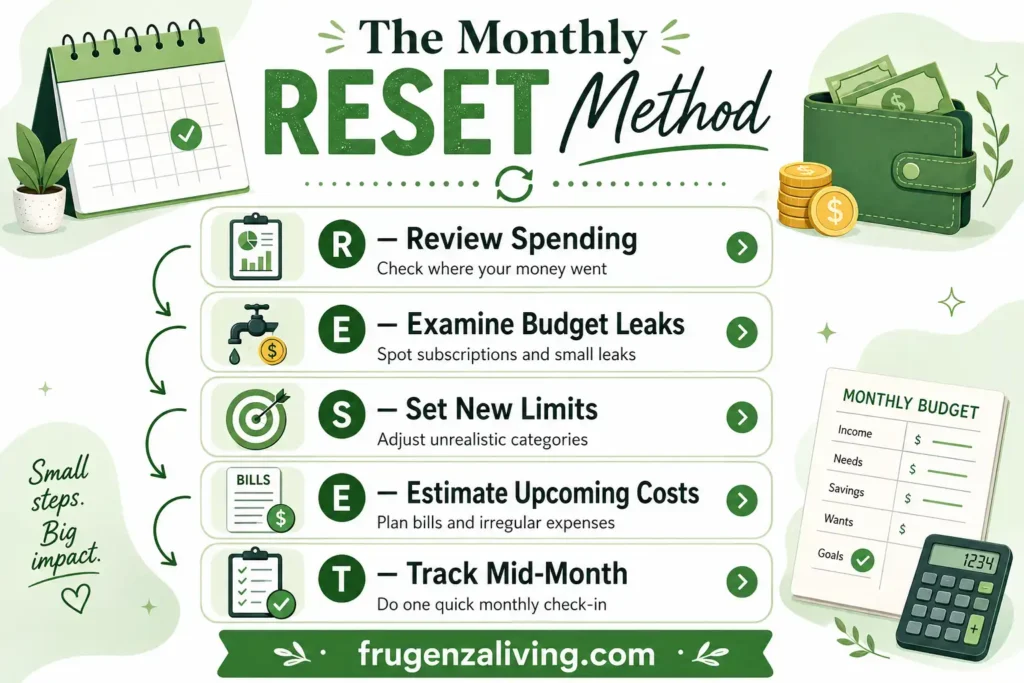
The Monthly RESET Method
To make the routine easier to repeat, use the Monthly RESET Method.
This framework keeps your monthly budget planning routine focused. You are not starting from zero every month. You are learning from the last month and making the next one easier to manage.
What You Should Have After the Reset
A monthly budget reset should leave you with a clearer plan, not just a vague feeling that you “looked at your money.”
By the end of your reset, you should know:
- Which categories need adjusting
- Which bills are coming next month
- Whether any subscriptions changed
- How much you can put toward savings or debt
- Which irregular expenses might create pressure
- When you will do your mid-month check-in
This makes the routine useful because you are not just reviewing the past. You are preparing the next month with better information.
During your monthly reset, update a monthly bills checklist so every due date, amount, and automatic payment is ready for the new month.
Step 1: Start With a Monthly Spending Review
Start with what actually happened, not what you wish happened.
Open your bank statement, credit card statement, budgeting app, spreadsheet, or notes. Look at your real spending from the past month.
You are looking for three things:
- What went as expected
- What went over budget
- What surprised you
Try not to turn this into a guilt session. The point is not to punish yourself. The point is to collect better information.
For example, if groceries went over budget again, it may not mean you are careless. It may mean your grocery category was too low from the start.
Your overspending category is not always the problem. Sometimes the category was unrealistic.
Your reset will feel easier if you already know how to budget after payday before the month gets messy.
Step 2: Find Your Budget Leaks
A budget leak is a small or repeated expense that quietly drains your money.
It does not always look serious at first. A few delivery fees, app charges, small online orders, or convenience purchases may not seem like much. But by the end of the month, they can explain why your budget felt tight.
Common budget leaks include:
- Subscriptions you forgot about
- Food delivery fees
- Impulse online orders
- Grocery extras
- Small app charges
- Convenience spending
- Random “just this once” purchases
Ask yourself:
- Did I pay for something I forgot about?
- Did any subscription renew?
- Did small purchases repeat too often?
- Did one category keep going over?
A monthly reset is especially useful when you need to adjust your budget with changing income.
Step 3: Check Next Month’s Bills and Due Dates
Do not copy last month’s budget without checking what is coming next.
A monthly bill checklist can save you from surprises. Before the new month starts, look at your regular bills and any upcoming changes.
Check:
- Rent or mortgage
- Utilities
- Phone and internet
- Insurance
- Minimum debt payments
- Subscriptions
- Annual renewals
- School, travel, or holiday costs
Autopay is useful, but only if you know when the money will leave your account. A bill that hits earlier than expected can make the rest of the month feel tight.
During your monthly reset, it helps to review sinking funds monthly so they still match your upcoming expenses.
Step 4: Reset Your Budget Categories
Now adjust your categories for the new month.
This is where many monthly budgets become more realistic.
If groceries went over by $80 for three months in a row, your grocery budget may need a reset, not another guilt trip. If gas was lower than expected, maybe that category can be reduced. If eating out keeps rising, you may need a weekly limit instead of one monthly number.
A helpful rule is the one-month carryover rule: if a category goes over once, review it. If it goes over for two or three months in a row, reset the category more seriously.
Common budget categories include:
- Housing
- Utilities
- Groceries
- Transportation
- Insurance
- Debt
- Savings
- Household basics
- Personal spending
- Fun money
The goal is not to make every category tiny. The goal is to make each category honest enough that you can actually follow it.
Step 5: Reset Savings and Debt Goals
Savings and debt should not depend only on whatever is left at the end of the month.
During your monthly budget reset, decide what you can realistically put toward:
- Emergency savings
- Sinking funds
- Extra debt payments
- Planned purchases
- Future bills
This amount does not have to be huge. A small consistent amount is usually better than an ambitious number you cannot repeat.
Debt works the same way. Minimum payments should be part of the budget from the start. Extra payments are helpful, but only after bills, basic needs, and a small buffer are covered.
Step 6: Prepare for Irregular Expenses
Many monthly budgets fail because they only include regular bills.
But real life includes irregular expenses.
These can include:
- Car registration
- Gifts
- School fees
- Medical copays
- Annual subscriptions
- Home repairs
- Pet care
- Holiday costs
- Clothing
- Car maintenance
Before the new month starts, look for next-month pressure points. These are expenses that have not happened yet but could put pressure on your budget soon.
For example, if your car registration is due next month, your budget should know that now. If holiday gifts are coming, start setting aside something early. If a pet appointment is likely, do not pretend the month will be normal.
This step makes your monthly financial reset more useful because it prepares for real life, not just regular bills.
Step 7: Set One Mid-Month Check-In
A monthly budget reset helps you start fresh, but one check-in keeps the plan from drifting.
Set a 10-minute review around the middle of the month.
Ask:
- Are bills paid or scheduled?
- Is grocery spending moving too fast?
- Did any subscription renew?
- Is the spending limit still realistic?
- Do I need to adjust one category before the month ends?
This mid-month check-in is not meant to be stressful. It is just a quick correction before a small problem becomes a full-month problem.
The real purpose of a monthly reset is to help you stay consistent with a budget even after a messy month.
Monthly Budget Reset Example
Here is a simple example of how a reset can work.
Last month:
- Groceries budgeted: $500, actual: $590
- Eating out budgeted: $120, actual: $180
- Utilities budgeted: $160, actual: $145
- Subscriptions: one surprise renewal for $49
Reset for next month:
- Groceries: raise to $560 and track weekly
- Eating out: lower to $140 with a smaller weekly limit
- Utilities: keep at $160
- Subscriptions: cancel one or add renewal to bills
- Add $50 sinking fund for car maintenance
This example is not about making the budget perfect. It is about making next month less surprising.
Monthly Budget Reset Checklist
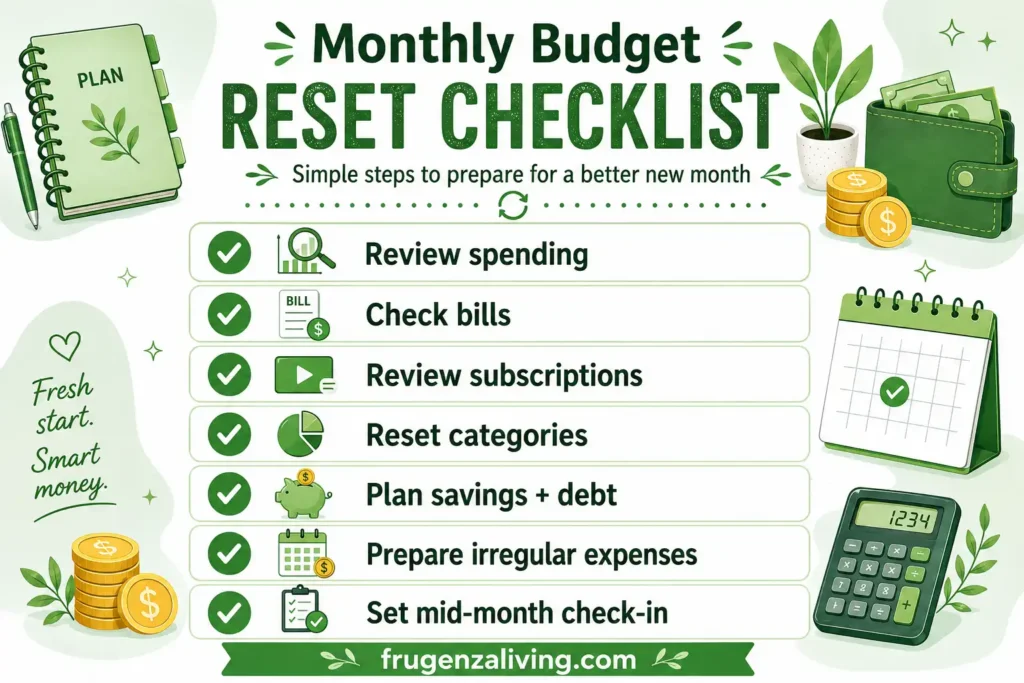
Use this checklist during your monthly money reset:
- Review last month’s spending.
- Note categories that went over.
- Check bills and due dates.
- Review subscriptions.
- Reset budget categories.
- Plan savings and debt.
- Prepare for irregular expenses.
- Set one mid-month check-in.
You can copy this money reset checklist into your notes app, planner, or budget spreadsheet. Keep it simple. If your monthly budget review feels too complicated, you may avoid it.
Common Monthly Budget Reset Mistakes
A budget reset is supposed to make the next month easier. Avoid these common mistakes:
- Copying last month without reviewing it: Your next budget should learn from the last one.
- Ignoring irregular expenses: Annual fees and seasonal costs can break a monthly budget.
- Making categories too strict: Unrealistic limits usually fail.
- Skipping subscriptions: Small renewals can quietly drain your budget.
- Only reviewing at the end: A mid-month check-in can catch problems earlier.
- Treating one bad month as failure: A reset is an adjustment, not a punishment.
Monthly Budget Reset vs Payday Budget Routine
A monthly budget reset and a payday budget routine are different tools.
A monthly budget reset gives you the big picture for the new month. It helps you review spending, reset categories, check bills, and prepare for upcoming expenses.
Final Thoughts: Make Your Budget Easier to Repeat
A monthly budget reset routine helps your budget stay connected to real life.
Instead of copying last month and hoping it works, you review what happened, find budget leaks, check upcoming bills, reset categories, plan savings and debt, prepare for irregular expenses, and schedule one mid-month check-in.
You do not need a perfect budget. You need a budget that learns.
A monthly budget reset is not about starting over because you failed. It is about starting the next month with better information.
FAQ
What is a monthly budget reset routine?
A monthly budget reset routine is a short review you do at the end or beginning of each month. It helps you check spending, bills, subscriptions, savings, debt, and budget categories before planning the next month.
When should I do a monthly budget reset?
The best time is usually two or three days before the new month starts. You can also do it on the last Sunday of the month, the last weekday, or the first morning of the new month.
How do I reset my budget for a new month?
Review last month’s spending, find budget leaks, check upcoming bills, reset categories, plan savings and debt, prepare for irregular expenses, and schedule a mid-month check-in.
How often should I reset my budget?
You can reset your budget once a month, ideally before the new month starts. If your income or bills change often, you may also want a quick mid-month check-in.
Why does my monthly budget keep failing?
Your monthly budget may keep failing because categories are unrealistic, irregular expenses are missing, subscriptions are overlooked, or you never adjust the budget based on real spending. A monthly reset helps fix that.

Read about Jeffi and Frugenza Living
- How to Budget a 10-Month Salary Over 12 Months - October 16, 2026
- Pet Adoption Budget Checklist: What You Still Need to Pay - October 16, 2026
- Proportional Bill Split Calculator for Two Incomes - October 15, 2026