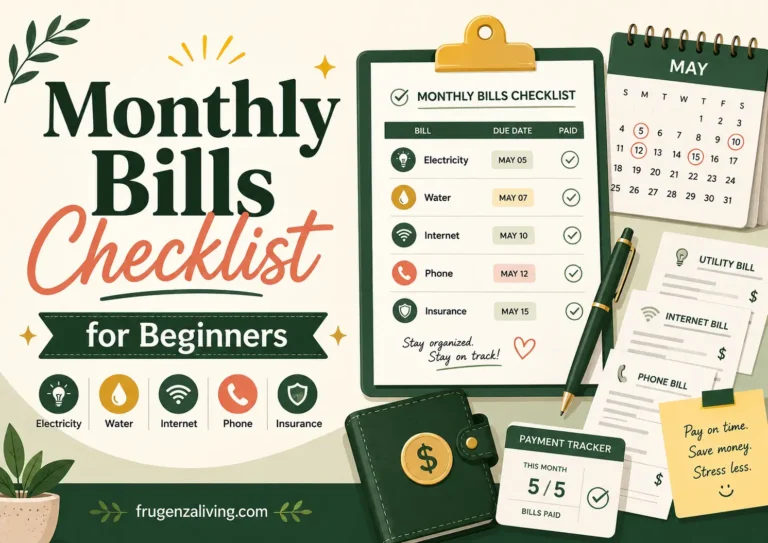
A monthly bills checklist keeps each bill’s amount, due date, payment source, and status in one place. Include rent or mortgage, utilities, phone, internet, insurance, debt payments, childcare, and subscriptions that apply to you.
Use the worksheet below to track what needs paying and what has actually finished processing. A scheduled payment still needs confirmation, and an annual renewal belongs on your master list even when it is not due this month.
Free Monthly Bills Checklist
Start with the bills due this month. For an unknown amount, use a labeled estimate and update it when the statement arrives. Start with the five simple entries; open detailed cards only when needed. The worksheet holds ten bills; add further entries in your own notebook or spreadsheet if needed.
For bills shared by two people, compare 50/50 and income-based bill contributions before agreeing on each person’s share.
Monthly Bill Control Board
Start with the bill name, amount, action date, due date, payment source, and status. Use the extra fields in detailed cards only when they help you track a variable bill, autopay, or a shared payment.
This is a fillable manual worksheet. It does not calculate totals, save entries, submit information, or update the review fields automatically. Entries may disappear after a refresh or when you leave the page. Do not enter account numbers, card numbers, passwords, or other sensitive information.
Fill the worksheet or print it blank. Before printing, open all five detailed cards and check the browser preview. Keep a copy before leaving the page.
Start Here: Bills 1–5
Use these entries for straightforward bills. Use the detailed cards below for payments needing closer monitoring.
Detailed Bills 6–10: Open a card when a bill needs additional checks.
Bill 6
Bill 7
Bill 8
Bill 9
Bill 10
Manual Monthly Review
Complete this summary yourself after reviewing all bill entries.
What Belongs on the Checklist?
Fixed monthly bills
These usually stay similar each cycle. Examples include rent or mortgage, loan minimum payments, internet, a phone plan, monthly insurance, and childcare fees. Include recurring subscriptions such as streaming, cloud storage, or a gym membership.
Variable monthly bills
These recur but change in amount. Electricity, water, heating, usage-based phone charges, and the required or planned credit-card payment shown on the current statement may belong here. Enter an estimate early, then replace it when the statement arrives.
Groceries, gasoline, dining out, and clothing are usually spending categories rather than bills unless they involve a recurring invoice, subscription, or required payment.
Non-monthly recurring bills
Annual insurance premiums, vehicle registration, professional memberships, software renewals, and semiannual fees belong on the master inventory even when they are not due this month.
A yearly bills checklist can help you separate monthly obligations from expenses that arrive only once or twice a year.
Build the Master List From Real Records
Review several months of bank and card activity, then check the previous 12 months for annual renewals. Search email for “statement,” “invoice,” “renewal,” and “payment due.” Include paper mail, account portals, app-store subscriptions, digital wallets, and memberships attached to older cards.
One month will not reveal every obligation. Build a master inventory first, then copy the bills relevant to the current month into your working checklist.
A monthly bills checklist becomes more useful when you organize bill due dates on one simple calendar.
Do Not Use One “Paid” Box for Every Stage
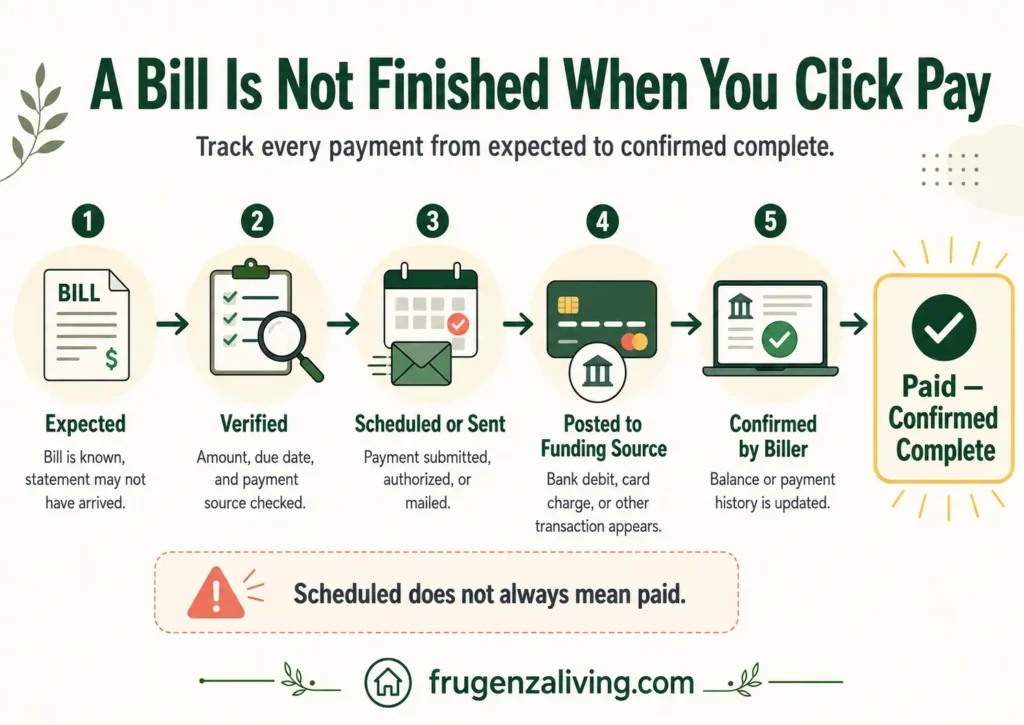
A payment can move through five steps:
- Expected: the obligation exists, but the current amount may not be available.
- Verified: the amount, due date, payment source, and method have been checked.
- Scheduled or sent: payment has been initiated or arranged.
- Posted: the transaction appears on the account used to pay.
- Confirmed: the biller credited the payment or updated the account.
For electronic payments, match the posted transaction with the biller’s record before marking the bill confirmed complete. For cash or an in-person payment, keep the official receipt. A scheduled-payment message alone is not proof of completion.
Use the Right Dates
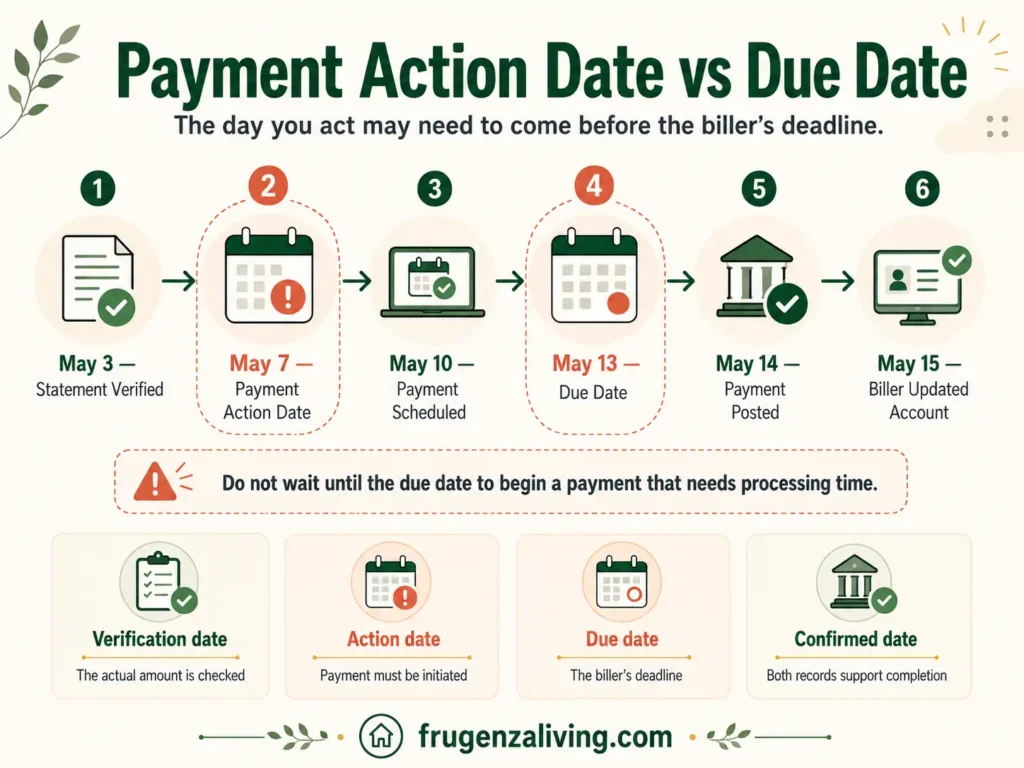
- Action date: when you must arrange or send payment.
- Due date: the biller’s payment deadline.
- Withdrawal date: when an automatic debit is expected to take money.
- Confirmed date: when you checked completion.
Check the biller’s processing times and cutoff rules. An action date and a withdrawal date are not always the same. Record an autopay withdrawal date in the notes if it differs. The CFPB’s Bill Calendar Tool also places payment actions before their deadlines.
How to Use the Checklist During the Month
- At the start: copy this month’s bills, add confirmed income dates, and choose a weekly review day.
- When a statement arrives: replace the estimate, verify the due date, and check the source of payment.
- Before payment: check the money needed for all upcoming commitments, not just that bill.
- After payment: keep it open until you have evidence of completion, then record the confirmed date.
Is the Money Ready for All Upcoming Bills?
Several payments can look affordable individually while competing for the same balance. Check the total leaving each funding account before the next confirmed income arrives.
Example: a $530 balance can still leave a shortfall
In this hypothetical example, the $530 bank balance has not yet been reduced by an $80 pending payment. That leaves $450.
Before the next payday, rent needs $350, electricity $70, and phone service $30: $450 in bills. Essential food and transport also need $40.
$450 available − $450 bills − $40 essentials = a $40 shortfall.
If your bank’s available balance already reflects the pending payment, do not subtract it again. Include other scheduled withdrawals and money already reserved for another purpose only once.
Use Autopay Without Making It Invisible
Autopay reduces manual work, but it does not confirm that a bill was paid. For each cycle:
- Before the withdrawal: check the statement, payment setting, expected date, and funds or card capacity available after other commitments. A higher bill may be valid; investigate the change rather than assuming an error.
- After a card or account change: update affected autopay arrangements and verify the next payment. Record replacements immediately instead of relying only on an annual check.
- After processing: match the posted transaction with the biller’s payment record. Keep unresolved payments open for follow-up.
A payment may also fail because an instruction was canceled, a transfer was returned, or processing was interrupted. If money left your account but the bill still looks unpaid, check the normal processing window and contact the provider with the reference before submitting a duplicate payment.
What If Bills and Paydays Do Not Line Up?
Add income dates to the bill calendar and identify gaps before each payment must leave its funding source. A monthly income total can cover your bills while the balance on a particular date cannot.
Contact the biller before the deadline and ask whether another due date is available; not every provider permits changes. Confirm the next statement and withdrawal date. Then assign bills to the paycheck that will fund them.
Keep Non-Monthly Bills Visible
Keep annual and quarterly obligations on the master inventory. Calculate preparation from the remaining gap: (expected bill − money already assigned) ÷ deposits before payment.
If a $1,200 premium has $300 saved and three monthly deposits remain, set aside $300 per deposit. This is advance preparation, not a bill payment to the insurer. When the premium is due, record the actual payment once; do not count both the savings transfer and premium as new spending.
When There Is Not Enough Money for Every Bill
Identify the shortfall and the consequences of missing each affected payment. Contact providers early and ask about due-date changes, assistance, fees, or a payment arrangement. Confirm any agreement before treating the deadline as changed.
A partial payment may not satisfy the bill. Ask what amount is required and how the account will be treated. Seek qualified local guidance when housing, utilities, legal obligations, or serious debt consequences are involved.
Make “Paid—Confirmed Complete” the Final Check
Start with this month’s bills and six details: name, amount, action date, due date, source, and status. Add detail when a payment needs closer attention. Keep scheduled payments visible until they are confirmed.
Use the checklist alongside your budget, which determines whether income can cover bills, spending, and goals. This monthly budget review helps you check the wider plan.
Examples use hypothetical U.S. dollar amounts. Payment processing times, contracts, and consumer protections vary by provider and location.

Read about Jeffi and Frugenza Living
- Proportional Bill Split Calculator for Two Incomes - October 15, 2026
- How to Split Grocery Bills With Roommates - October 14, 2026
- First Apartment Kitchen Essentials on a Budget - October 13, 2026