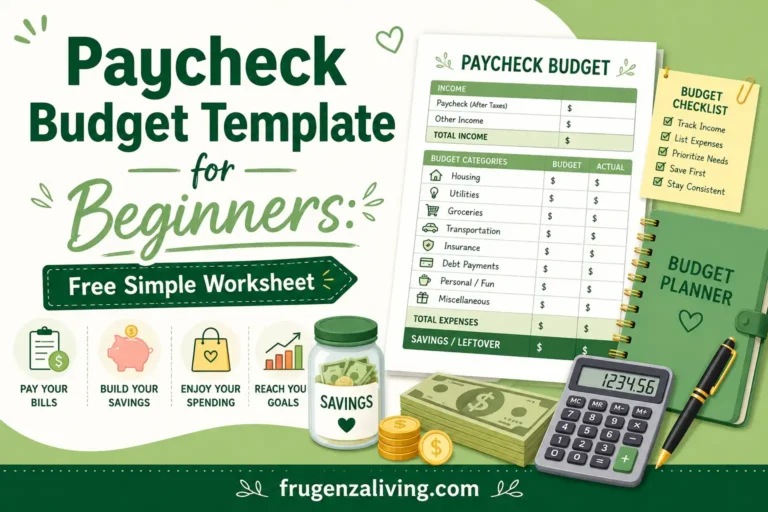
Looking for a paycheck budget template for beginners? This simple worksheet helps you plan one paycheck before the money disappears into bills, groceries, debt, and random spending.
A monthly budget can feel too big when you’re just starting out. A paycheck budget is easier because it focuses on one payday at a time. Instead of trying to control the whole month, you only ask: What does this paycheck need to cover before the next one arrives?
You can use this template in a notebook, Google Sheets, Excel, a printable page, or a notes app. It works whether you’re paid weekly, biweekly, semi-monthly, or monthly.
This is general budgeting education, not professional financial advice. Use the examples as a starting point and adjust them based on your own income, bill due dates, debt payments, and basic needs.
Quick Answer: What Is a Paycheck Budget Template?
A paycheck budget template is a simple worksheet that helps beginners plan one paycheck before spending it.
It should include take-home pay, bills due before the next payday, savings, debt payments, flexible spending, budgeted vs actual spending, remaining balance, and a leftover plan. This helps you budget by paycheck instead of guessing where the money should go after payday.
Free Simple Paycheck Budget Template for Beginners
Use this copyable paycheck budget worksheet before you spend from your next paycheck. You can copy it into Google Sheets, Excel, a notes app, or print it as a simple one-page budget planner.
This template works because it keeps your paycheck budget simple. You are not trying to track every tiny detail at first. You are only deciding what this paycheck needs to do before the next one arrives.
Free Paycheck Budget Template
Use this simple worksheet to plan bills, savings, debt, spending, and leftover money before your next payday.
Download Printable PDF Open Google Sheets TemplateBefore filling out your template, it helps to choose a paycheck breakdown percentage that fits your bills, savings goals, and spending habits.
Why Budget by Paycheck Instead of Monthly?
A monthly budget gives you the big picture. It can show your total income, total bills, savings goals, and overall spending.
But beginners often struggle with timing.
You may know that you earn enough for the month, but still run short between paydays. That usually happens because monthly budgeting does not always show which bills need to be paid from the paycheck you have right now.
If your salary is paid over ten months, plan for the months without pay before deciding how much of each paycheck is available for current spending.
A paycheck budget answers a more practical question:
What needs to happen before the next payday?
That question matters whether you are paid weekly, biweekly, semi-monthly, or monthly. The paycheck budgeting method helps you focus on the money that is actually available today.
The goal is not to create the perfect spreadsheet. The goal is to stop guessing after payday.
If you get paid every two weeks, this template works better when you know how to budget biweekly paychecks clearly.
What to Include in a Simple Paycheck Budget Template
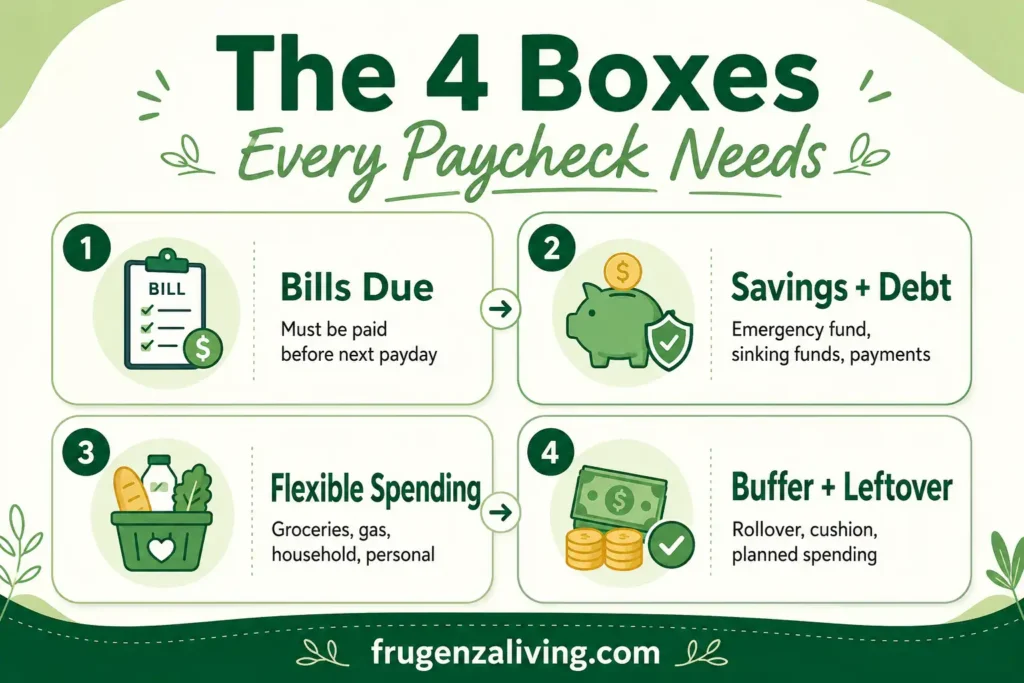
A beginner paycheck budget should be simple enough to repeat.
The easiest way to think about it is the 4-box beginner rule:
- Bills due: payments that must happen before the next paycheck.
- Savings and debt: emergency savings, sinking funds, and debt payments.
- Flexible spending: groceries, gas, household items, and personal spending.
- Buffer or leftover money: money kept for surprises, rollover, or planned spending.
You do not need 25 categories, complicated formulas, or a perfect budget app. Too many categories can make a beginner paycheck budget harder to use.
Start simple. You can always add more detail later. A paycheck template becomes more useful when you know how to budget after payday before spending starts.
How to Fill Out a Paycheck Budget Template Step by Step
Step 1: Write Down Your Take-Home Pay
Start with your net pay, not your gross pay.
Gross pay is your income before taxes, insurance, retirement contributions, and other deductions. Take-home pay is the amount that actually lands in your bank account.
If your income changes from paycheck to paycheck, use a conservative number.
For example:
- Paycheck amount: $1,700
- Extra overtime: $120
- Total deposit: $1,820
For your base budget, use $1,700, not $1,820.
That way, your basic bills and spending are not depending on overtime that may not always be there. You can use the extra $120 for savings, debt, a sinking fund, or a small buffer.
Before filling out the template, it helps to know how to split your income for budgeting in a simple way.
Step 2: List Bills Due Before the Next Paycheck
This is the most important part of a paycheck budget worksheet.
Do not start with groceries, eating out, or personal spending. Start with bills that are due before your next payday.
Common bills may include:
- Rent or mortgage set-aside
- Utilities
- Phone
- Internet
- Insurance
- Minimum debt payment
- Subscriptions
The due date matters more than the category.
A bill due tomorrow should be handled before money goes to flexible spending.
Step 3: Add Savings and Debt Payments
After bills, add savings and debt payments.
This does not mean you need to save a huge amount from every paycheck. For beginners, the goal is to create a repeatable habit.
Your savings section can include an emergency fund, sinking fund, planned purchase, or small future expense. Your debt section can include minimum payments, credit card payments, loan payments, or extra payments if your basic needs are already covered.
Even $25 or $50 per paycheck can help you build momentum if it is consistent.
Step 4: Set Flexible Spending Categories
Flexible spending is where many beginner budgets break.
These are expenses that change from paycheck to paycheck. Start with 5–7 categories, such as:
- Groceries
- Gas or transportation
- Household basics
- Eating out
- Personal spending
- Kids or pets
- Small buffer
Beginner rule: if a category is too hard to predict, give it a small weekly limit first.
For example, instead of guessing your total eating-out cost for the whole month, you might set a limit of $30 per week. That is easier to track and easier to adjust.
A simple template should help you organize your budget categories before the money disappears.
Step 5: Give Leftover Money a Job
This is the part many beginners skip.
After bills, savings, debt, and flexible spending, you may have money left. It can feel like free money, but leftover money without a job usually disappears.
You can use leftover money to:
- Save it
- Roll it over
- Pay debt
- Add to a sinking fund
- Keep as buffer
- Use for planned spending
For example, if you have $85 left after filling out your paycheck budget, you might put $50 into savings and keep $35 as a cushion until the next payday.
That small decision can prevent random spending and make your next paycheck less stressful.
A paycheck budget becomes more effective when it is part of a simple financial routine you can follow after payday.
Track Your Remaining Balance
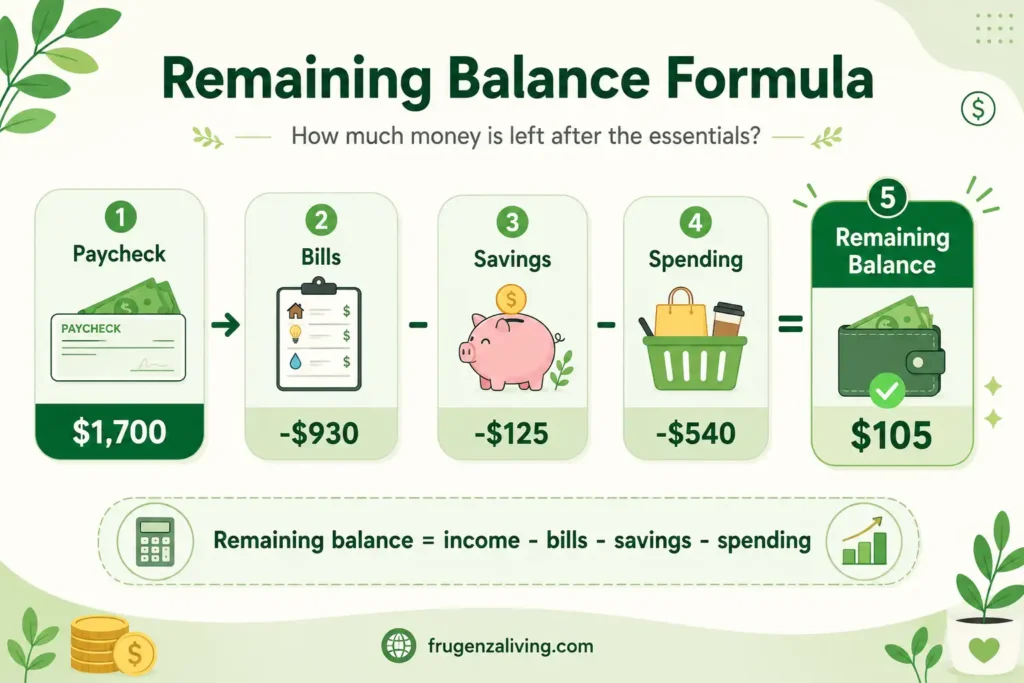
A good paycheck budget template should show your remaining balance.
Use this formula:
Remaining balance = total available income – bills – savings – debt – flexible spending
For example:
- Paycheck: $1,700
- Bills: -$930
- Savings: -$125
- Spending: -$540
- Remaining balance: $105
If your remaining balance is negative, your budget is trying to spend more than the paycheck can cover. You may need to lower a category, move a bill to another paycheck, reduce flexible spending, or adjust your plan.
If your remaining balance is positive, give it a job. Keep it as a buffer, roll it over, save it, or use it for planned spending.
Paycheck Budget Worksheet: Budgeted vs Actual Spending
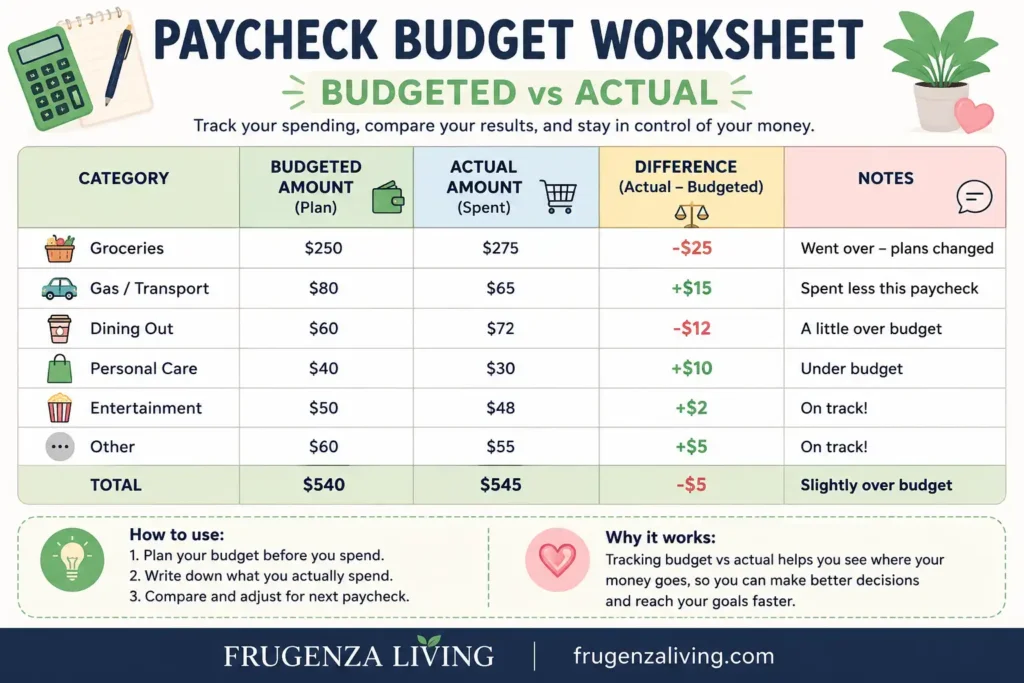
Your first paycheck budget is only a guess.
That does not mean it is wrong. It means you need to compare what you planned with what actually happened.
For flexible categories, add two simple lines:
- Budgeted:
- Actual:
For example:
Groceries
Budgeted: $250
Actual: $275
That $25 difference tells you what to adjust next payday. Maybe grocery prices were higher. Maybe you forgot one store trip. Maybe the category was too low from the start.
This is how a simple paycheck budget worksheet becomes more accurate over time. You are not just planning. You are learning your real numbers.
How to Use This Template in Google Sheets or Excel
You can turn this paycheck budget worksheet into a simple spreadsheet.
Create columns like this:
- Category
- Budgeted
- Actual
- Difference
- Notes
Then create rows for bills, savings, debt, groceries, gas, household basics, personal spending, and buffer.
For the difference column, subtract actual spending from the budgeted amount. For remaining balance, subtract all planned categories from your total paycheck amount.
You can duplicate the sheet or tab for each payday. That way, every paycheck has its own simple plan.
Paycheck Budget Example for Beginners
Let’s look at a simple paycheck budget example.
Paycheck amount: $1,700
Bills due:
- Rent set-aside: $650
- Phone: $60
- Utilities: $120
- Minimum debt payment: $100
Savings:
- Emergency fund: $75
- Sinking fund: $50
Flexible spending:
- Groceries: $250
- Gas: $100
- Eating out: $60
- Personal spending: $80
- Household basics: $50
Leftover or buffer:
- Buffer: $105
Total:
$650 + $60 + $120 + $100 + $75 + $50 + $250 + $100 + $60 + $80 + $50 + $105 = $1,700
This is a zero-based paycheck budget because every dollar has a job. But it does not have to feel strict. The buffer gives you breathing room before the next payday.
$930 Rent set-aside, phone, utilities, debt minimum Savings $125 Emergency fund and sinking fund Flexible Spending $540 Groceries, gas, eating out, personal, household basics Buffer $105 Small cushion before the next paycheckTotal: $930 + $125 + $540 + $105 = $1,700
The numbers above are only examples. Your real paycheck budget should match your own income, bill due dates, minimum payments, and basic needs.
Common Paycheck Budget Template Mistakes
Even a simple paycheck budget template can fail if it becomes too complicated. Watch for these common mistakes:
- Starting with gross pay: Use take-home pay, not pre-tax income.
- Forgetting bill due dates: A bill due before next payday should come first.
- Creating too many categories: Beginners usually do better with fewer categories.
- Not planning leftover money: Leftover money without a job usually disappears.
- Ignoring small expenses: Coffee, subscriptions, and quick purchases can break a paycheck budget.
- Making the template too complicated: A beginner template should be easy to repeat.
- Never checking actual spending: Add an actual spent line so you can adjust next payday.
Paycheck Budget Template vs Monthly Budget
A paycheck budget and a monthly budget are not enemies. They simply do different jobs.
A monthly budget gives you the big picture. A paycheck budget helps with timing. It shows what this specific paycheck needs to cover before the next payday.
For beginners, starting with a paycheck budget can feel easier because it is more immediate. You are not trying to solve the whole month at once. You are just planning the money in front of you.
FAQ
What is a paycheck budget template?
A paycheck budget template is a worksheet that helps you plan one paycheck at a time. A paycheck budget template for beginners usually includes take-home pay, bills, savings, debt, flexible spending, remaining balance, and leftover money.
What should a paycheck budget template include?
A simple paycheck budget template should include paycheck amount, bills due before the next payday, savings, debt payments, flexible spending categories, budgeted vs actual spending, remaining balance, and a leftover plan.
How do beginners budget a paycheck?
Beginners can budget a paycheck by starting with take-home pay, subtracting bills due before the next payday, adding savings and debt payments, setting flexible spending limits, tracking remaining balance, and giving leftover money a job.
Can I use this paycheck budget template in Google Sheets or Excel?
Yes. You can copy the template into Google Sheets or Excel and create columns for category, budgeted amount, actual amount, difference, and notes. You can also duplicate the sheet for each payday.
Can I use this paycheck budget template if my income changes?
Yes. If your income changes, build your budget around your lowest normal paycheck. Use extra income from larger paychecks for savings, debt, sinking funds, or a small buffer.
Final Thoughts: Keep the Template Simple Enough to Repeat
The best paycheck budget template for beginners is not the most detailed one. It is the one you can actually use every payday.
Start with take-home pay. List bills due before the next paycheck. Add savings and debt payments. Set a few flexible spending categories. Track your remaining balance. Then give leftover money a clear job.
After that, compare your budgeted amount with what you actually spent. That small review helps your next paycheck budget become more realistic.
A beginner paycheck budget gives your money direction. Once payday feels less random, budgeting becomes much easier to repeat.

Read about Jeffi and Frugenza Living
- How to Budget a 10-Month Salary Over 12 Months - October 16, 2026
- Pet Adoption Budget Checklist: What You Still Need to Pay - October 16, 2026
- Proportional Bill Split Calculator for Two Incomes - October 15, 2026