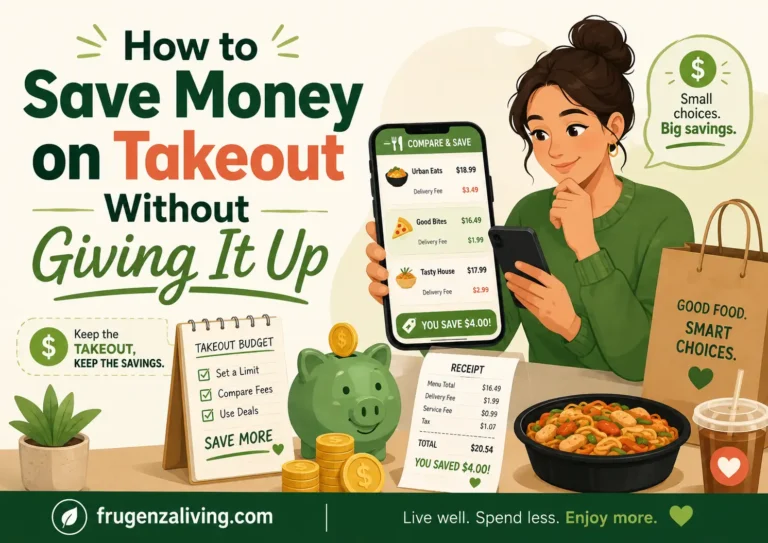
Imagine choosing a $16 entrée and seeing a $27 total by the time you reach checkout. The difference may come from a higher app price, mandatory fees, tax, a tip, or extras that slipped into the basket while you were browsing.
Learning how to save money on takeout is less about hunting for the cheapest menu item and more about controlling the full order cost. The most useful savings usually come from four decisions: how you get the food, what enters the basket, what the checkout screen actually charges, and how many portions you will genuinely eat.
What Is the Best Way to Save Money on Takeout?
Start with a limit for the final checkout total, then compare the same intended order through two methods you would realistically use. Review the food subtotal, tax, mandatory fees, and planned tip before choosing.
Next, remove add-ons that do not improve the meal and estimate the number of portions you will actually use. Pickup or direct ordering may cost less, but promotions, transportation, illness, mobility, or a demanding schedule can change the result.
The goal is to see the full price before checkout prompts and discount language shape the decision.
Preparing a few affordable meals ahead makes it less tempting to open a delivery app after a long day.
Pickup and Delivery Need Different Saving Strategies
“Takeout” usually refers to restaurant food collected for pickup, although people sometimes use it broadly for any restaurant meal eaten at home. “Takeaway” is the more common term in the UK and parts of Europe.
For pickup, concentrate on direct menu prices, portion value, lunch offers, restaurant rewards, and unnecessary sides or drinks. For delivery, check whether menu prices differ, then add mandatory charges, tax, and the tip you intend to leave.
Direct ordering means using the restaurant’s verified website, official app, published phone number, or counter. It may avoid some third-party costs, but it is not automatically cheaper. An app promotion can occasionally produce a lower final total.
Start from a restaurant’s official website or confirmed profile, then compare matching food orders rather than changing the basket on each platform.
The Menu Price Is Not the Amount You Pay
Depending on the restaurant, platform, location, and order size, the checkout screen may contain:
- the food subtotal;
- a difference between direct and third-party menu prices;
- delivery or service charges;
- small-order or local fees;
- tax;
- a driver tip;
- drinks, upgrades, sauces, sides, or desserts added during checkout.
Not every order includes every charge. A “$0 delivery fee” label also does not necessarily mean the delivered order costs the same as pickup.
In April 2026, the Federal Trade Commission requested public comment on whether a rule might be needed to address unfair or deceptive fee practices in online food and grocery delivery. The request covered price disclosure, fee descriptions, price differences, and promotion restrictions. It was not a finalized nationwide rule.
Do not treat the delivery driver’s tip as the first place to cut. Check the ordering method, required charges, and basket additions before shifting the cost to the person bringing the food.
Compare an Identical Order
Use this as a visual checklist: screenshot it, or copy the fields into your notes before choosing.
Direct Pickup
Travel, parking, fuel, accessibility, or time: ______
Direct Delivery
Arrival time, minimum, or restrictions: ______
Third-Party Delivery
Promotion, membership, or order condition: ______
Difference from the lowest option you would actually use: $____
Keep the food order identical. Otherwise, you are comparing different meals rather than different ordering methods.
How to Run Your Own Same-Basket Comparison
Choose the restaurant, build the meal through its verified direct channel, then recreate the identical order through one other available method. Continue far enough to see the final checkout total; you do not need to complete either transaction.
Record the date, city, items, promotion, required charges, and intended tip. Prices can change, so an old comparison may not describe tonight’s order.
A 2025 LendingTree comparison of delivery and pickup costs reviewed selected meals from five restaurant chains across ten large U.S. metropolitan areas. Delivery cost substantially more than pickup on average in that sample.
The study does not establish a universal markup, but it shows why checking an identical order is more useful than assuming the listed entrée price tells the whole story.
Calculate the Cost of the Meals You Will Actually Eat
A family bundle, large entrée, or combo only saves money when the extra food becomes another meal.
Use:
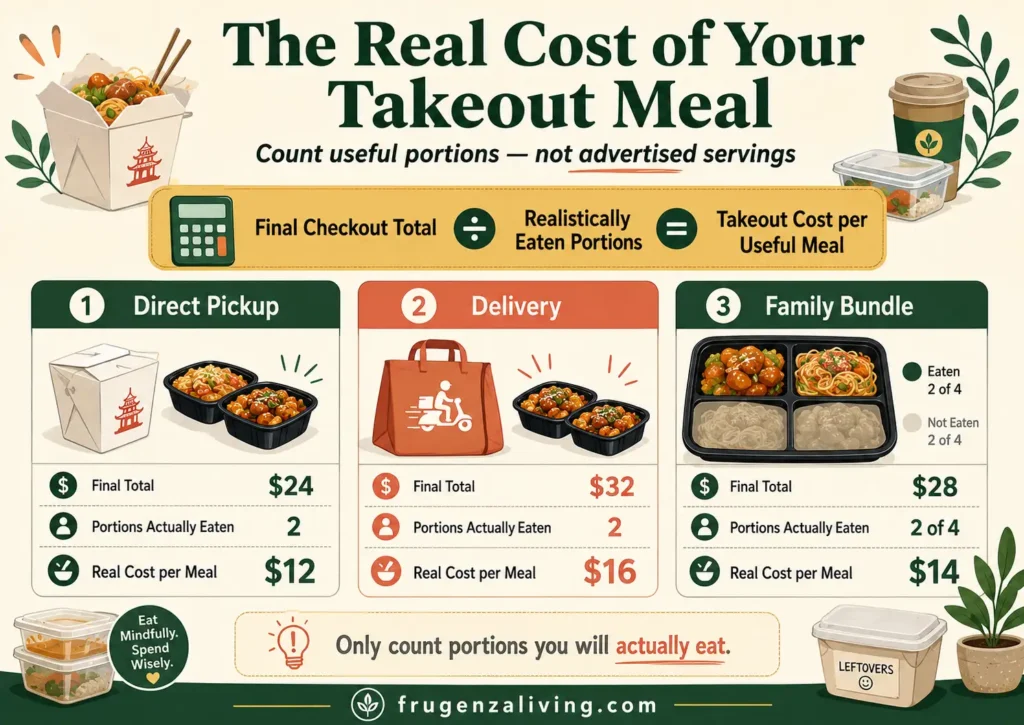
Takeout Cost per Useful Meal = Final Checkout Total ÷ Realistically Eaten Portions
Suppose pickup costs $24 and the food gives you two portions you will genuinely eat. The cost is $12 per useful meal. If delivery raises the final total to $32, the same food costs $16 per meal.
Now consider a $28 bundle advertised as four servings. If two portions are likely to sit in the refrigerator until you lose interest, its practical cost is $14 per useful meal—not $7.
Count only food you already know you enjoy reheated and can store safely. According to USDA guidance for takeout food, perishable items should generally be refrigerated within two hours of purchase or delivery, or within one hour when temperatures are above 90°F.
The USDA’s leftovers guidance says most cooked leftovers should generally be used within three to four refrigerated days.
Buying more to create an impressive cost-per-serving number is not saving if the extra portion becomes waste.
A few quick budget meals can make cooking feel realistic even when your energy and time are limited.
What Is Delivery Convenience Worth Today?
Compare delivery with the lowest-cost option you would genuinely use:
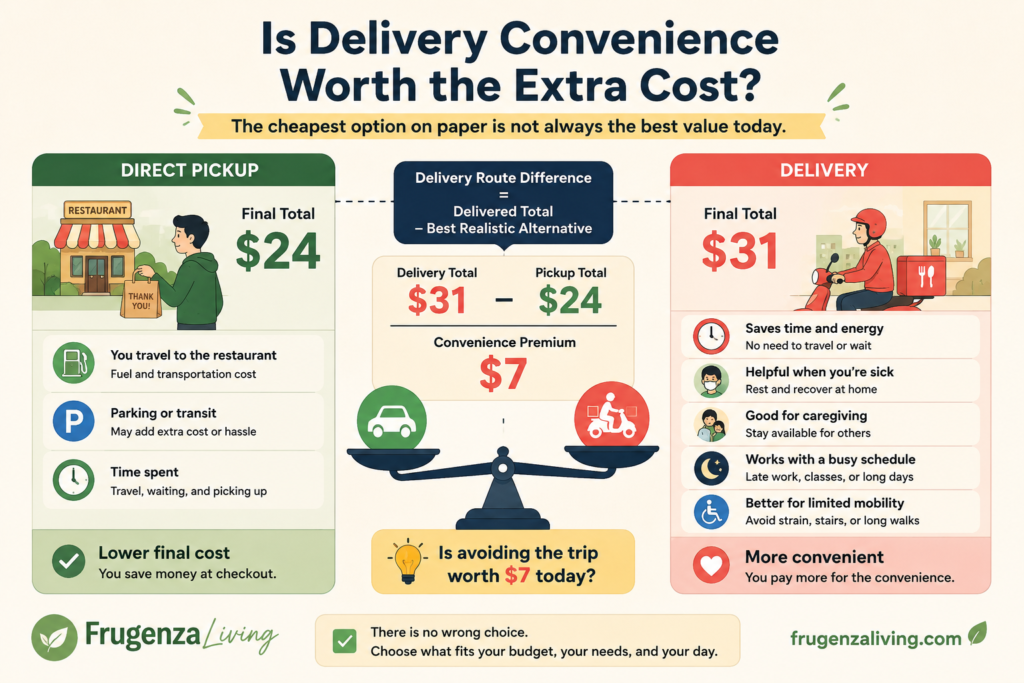
Delivery Route Difference = Delivered Final Total − Best Realistic Alternative
If delivery totals $31 and direct pickup totals $24, the difference is $7. That is the convenience premium you are paying to avoid the trip.
A positive result represents an added cost. A zero or negative result means delivery is currently equal to or cheaper than the alternative being compared, possibly because of a promotion.
The best realistic alternative is not an imaginary homemade dinner. It is an option you could genuinely use that day.
Pickup is also not automatically better value. Fuel, transit, parking, distance, limited mobility, illness, caregiving, or a late workday can make the extra payment reasonable. Identify what the difference buys and decide whether that benefit matters today.
If you reduce takeout but still buy convenience snacks every day, learning how to spend less on snacks can lower your total food spending even further.
Ask Three Questions Before You Pay
Does the final checkout total fit the limit you set?
Set the ceiling before browsing, and include tax, required charges, and the intended tip. A $25 limit should mean $25 at the payment screen—not $25 of food plus another $9 afterward.
Will you actually eat the portions you counted?
Remove theoretical leftovers from the calculation. A second meal has value only when it is likely to be stored and eaten.
Is the convenience worth the difference today?
Know how much more the easier option costs. Paying extra can be intentional; discovering the premium only after checkout is different.
If any answer is no, revise the basket, ordering method, or timing before paying.
To break the takeout spending habit, identify the situations that usually trigger an order, such as stress, exhaustion, or an empty refrigerator.
Trim the Extras Before Choosing a Cheaper Entrée
You may save more by removing low-value extras than by replacing the entrée with something you do not want.
Check for restaurant drinks when you already have a drink at home, duplicate sides, automatic upgrades, extra utensils, and desserts or appetizers added only to reach a promotion threshold. Keep anything that genuinely improves the meal.
Ask: “Would I add this if it had not been suggested to me right now?” This separates what you chose from what checkout placed in front of you.
Make Discounts Reduce the Price, Not Enlarge the Order
Check the restaurant’s own specials before opening a delivery app; a direct lunch offer or family bundle may not appear on third-party menus.
Restaurant rewards, group orders, family bundles, and discounted gift cards can help, but only when they reduce the price of something you already intended to buy.
Free-delivery thresholds are a common trap. Adding $9 of food to avoid a $4 charge increases the bill by $5 unless the extra food creates useful meals you would otherwise buy.
For a delivery membership, review recent eligible receipts. Divide the monthly fee by the average amount the membership actually saved per qualifying order. The result estimates how many eligible orders you need before the fee pays for itself.
Use actual savings rather than an advertised maximum. Menu differences, service charges, restaurant eligibility, and minimum-order rules may remain. A membership that encourages additional takeout occasions can raise spending even when it reduces the fee on each order.
Set a Takeout Limit That Fits Real Life
There is no universal percentage of income that everyone should spend on takeout. Choose one boundary that fits the rest of your food budget:
- a maximum final checkout total per order;
- a monthly takeout allowance;
- a fixed number of planned orders.
For example:
“I can order takeout twice this month, with a final checkout limit of $25 each time.”
The limit is a ceiling, not a target. Spending $19 does not create a reason to add another item.
A flexible weekly meal plan can reduce last-minute ordering without requiring elaborate cooking.
The examples in this article use illustrative numbers. Actual restaurant prices, taxes, fees, tips, promotions, and food-storage needs vary by location and order.
Save Money by Reviewing the Whole Order
Saving money on takeout is not mainly about finding the lowest menu price. It is about checking the final checkout total, choosing the best ordering method for that day, removing additions that do not improve the meal, and counting only portions you will use.
Before your next order, set your limit and compare an identical basket through direct pickup and one other available method. Then divide the lower final total by the number of meals you realistically expect to eat.
That is how to save money on takeout without pretending convenience has no value or making every restaurant meal feel like a financial mistake.
Frequently Asked Questions
Is Pickup Always Cheaper Than Delivery?
No. Pickup often removes delivery-related charges, but transportation, parking, promotions, accessibility, and time can change the decision. Compare an identical order and review the final checkout total through the options you would genuinely use.
Is a Food Delivery Membership Worth It?
It may be worthwhile when the fee is lower than savings on orders you already planned. Review recent receipts and check minimum orders, restaurant eligibility, and remaining service charges.
How Much Should I Budget for Takeout?
There is no universal percentage. Choose a monthly amount, maximum checkout price, or fixed number of planned occasions that fits within your overall food spending. Set the boundary before browsing and include taxes, mandatory charges, and tips.

Read about Jeffi and Frugenza Living
- Proportional Bill Split Calculator for Two Incomes - October 15, 2026
- How to Split Grocery Bills With Roommates - October 14, 2026
- First Apartment Kitchen Essentials on a Budget - October 13, 2026