
An internet plan can look affordable until the introductory price disappears, equipment fees remain, and a temporary credit makes one bill look lower than the next. When service also feels slow in one room, upgrading may seem necessary—even when the problem is Wi-Fi coverage rather than plan capacity.
Learning how to lower your internet bill starts with three numbers: the advertised price, the amount paid now, and the average monthly cost after promotions, fees, and switching expenses. Read the bill, test service fit, and compare complete terms before negotiating or switching.
This guide focuses on residential internet bills in the United States. Pricing rules, assistance programs, taxes, and provider options differ by location.
Start With the Bill, Not the Sales Page
Download the last three bills and place them side by side. Look for:
- the base internet price;
- promotional credits and expiration dates;
- modem, gateway, router, or managed Wi-Fi charges;
- security, support, data, or unlimited-data add-ons;
- autopay, paperless-billing, and bundle discounts;
- taxes shown on the bill, provider-imposed fees, and one-time adjustments.
A temporary credit is not a lower recurring rate. A $60 one-time credit equals $5 per month over one year. If the recurring price remains $15 higher, it offsets only four months of the increase.
The FCC’s Broadband Consumer Labels can show monthly pricing, introductory-rate details, additional charges, data allowances, typical speeds, and latency. Treat the sales-page headline as the advertised price. Use the label and written offer to identify its conditions.
For a grandfathered, bundled, retention, or account-specific plan, compare any current label with your bill, original order summary, and written account terms.
Run the Three-Price Internet Audit
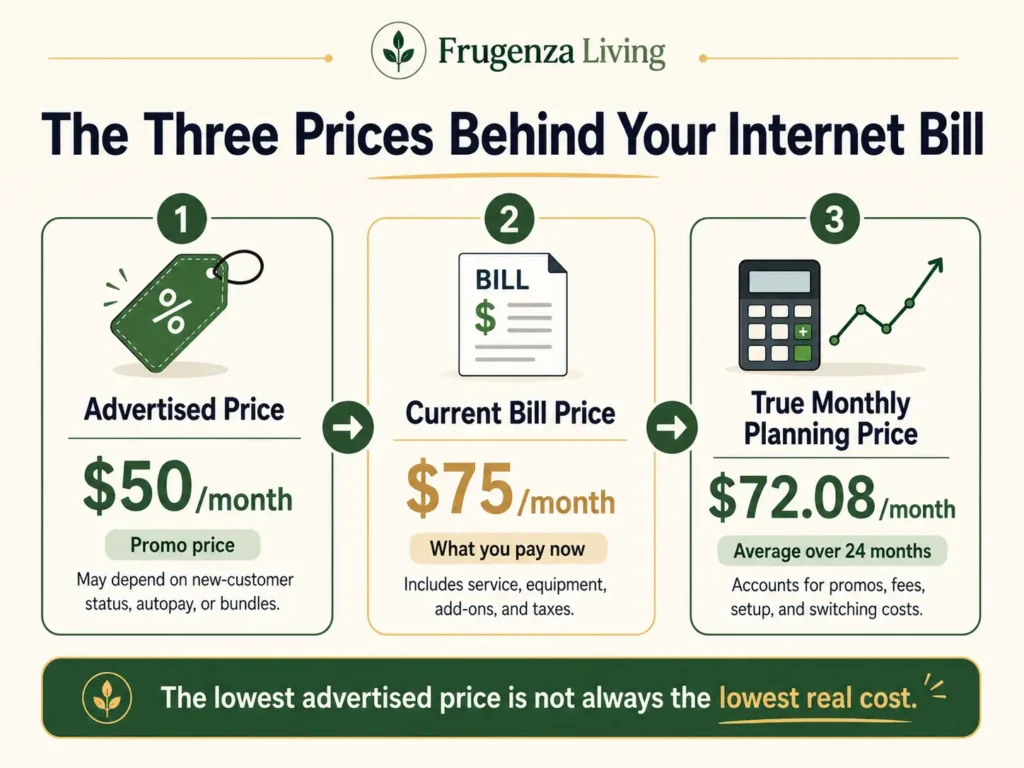
Write down:
Advertised price: The marketing headline, which may depend on new-customer status, autopay, paperless billing, a bundle, or a limited promotion.
Current bill price: What leaves your account now, including equipment, add-ons, data charges, recurring fees, taxes shown on the bill, and active discounts.
True monthly planning price: The normalized monthly cost over the same 12- or 24-month period.
Use:
Planning-period cost = recurring service + recurring fees and estimated taxes + equipment + setup or activation + expected data charges + overlap or exit costs − confirmed credits
Then calculate:
True monthly planning price = total planning-period cost ÷ months compared
Use the same period and cost categories for every option. You can save money without cutting everything by choosing the speed you actually need instead of canceling a service you rely on
A Bill Can Look Cheap and Still Cost More
Consider a composite household whose promotion has ended. The service price rises, gateway rental continues, and one bill looks temporarily lower because of a courtesy credit.
For illustration, Plan A costs $50 per month for 12 months, then $70 for 12 months, plus a $10 monthly equipment fee and $50 setup charge. Its 24-month cost is $1,730, or about $72.08 per month.
Assume Plan B stays at $60 for all 24 months, has no equipment rental or additional recurring fee, and charges $100 for installation. It costs $1,540, or about $64.17 per month. In this illustration, the higher headline price produces the lower planning price.
Real offers may include taxes, later rate changes, bundles, equipment, or service overlap. Gather three recent bills, the available Broadband Labels for both options, promotion dates, equipment terms, and confirmed availability.
Internet Bill Leak Finder
Open each issue that applies and collect the evidence before contacting your provider.
My bill jumped suddenly
A promotion expired or a temporary credit ended.
EvidencePrior bill, current bill, promotion end date, and Broadband Label.
I pay a monthly modem, gateway, or Wi-Fi fee
Equipment rental or a managed Wi-Fi add-on.
EvidenceMonthly fee, compatibility list, support terms, and break-even months.
Internet is slow only in certain rooms
Wi-Fi coverage, device limitations, or local network conditions rather than plan capacity alone.
EvidenceNear-router test, problem-room result, wired result if available, and device used.
I pay for a premium speed tier
The plan may exceed peak-use needs.
EvidenceSimultaneous activities, upload needs, current terms, and lower-tier terms.
My bill includes data or add-on charges
A data allowance, security package, unlimited-data option, or unused add-on.
EvidenceThree months of charges and usage.
A new provider looks much cheaper
The comparison may use promotional pricing.
EvidencePost-promotion rate, equipment, installation, contract, data terms, and confirmed credits.
Next step: Start with the largest recurring charge, nearest price increase, or clearest billing error.
Provider prices, eligibility, equipment rules, taxes, and availability can change by address and account.
Test Whether You Need a Cheaper Plan or a Better Home Network
A weak connection in one bedroom does not automatically mean the household needs a faster tier. FCC broadband measurement research explains that performance can be affected by equipment and the connection between a device and the home network.
For several days, observe the busiest household period. Note simultaneous video calls, streaming, gaming, cloud backups, security cameras, and large uploads. Compare:
- performance near the router and in the problem area;
- a wired result, when practical;
- several tests at comparable busy times;
- typical speeds and latency on the Broadband Label;
- documented outages or recurring problems.
A higher tier may not fix poor Wi-Fi coverage, weak router placement, an older device, or a crowded home network. A downgrade can also fail when several people work, stream, upload, or game at once. Judge the plan during realistic peak use.
Right-Size the Plan Without Downgrading Blindly
A lower tier may be worth testing when household use is modest, the current tier’s capacity is rarely needed, and the lower plan keeps acceptable data, equipment, and post-promotion terms.
Be cautious when the home regularly handles simultaneous meetings, large uploads, backups, cameras, gaming, and streaming. Upload speed and latency may matter as much as headline download speed.
Ask whether the downgrade can be reversed, begins a contract, adds a data cap or fee, changes equipment terms, or removes a price lock, unlimited-data benefit, or bundle discount. Do not downgrade solely because a generic Mbps chart says a tier is “enough.”
Calculate Equipment Break-Even Before Buying Anything
Use:
Equipment break-even months = compatible equipment cost ÷ monthly rental fee avoided
For illustration, equipment costing $180 takes 18 months to recover if it removes a $10 monthly fee. Savings begin only if the device remains compatible and useful beyond that point.
Check the provider’s compatibility list and rental terms. A modem, router, gateway, mesh system, and fiber ONT are not interchangeable. Voice service may require specific hardware, while ownership can change support, replacement coverage, managed Wi-Fi features, and warranty responsibility.
Buy only after confirming the exact equipment that can be replaced and the fee that will disappear.
Negotiate With Evidence, Not Empty Threats
Choose one primary target: a lower recurring rate, removal of an equipment fee, a suitable lower tier, or a written price guarantee.
Gather the current total, fee breakdown, promotion end date, account terms, current Broadband Label, and one genuinely available competing offer.
Use this script:
“I’m reviewing my recurring internet costs. My current monthly total is ___, including ___ for equipment or add-ons. My promotional rate ended on ___. I found a comparable plan available at my address for ___. Could you check current-customer pricing or another option that would reduce my recurring total?”
Do not invent an offer or threaten cancellation unless you are prepared to follow through.
Before accepting, ask about the later rate, payment-method conditions, contract, lost discounts, and start date. Record the recurring price, promotion length, post-promotion rate, equipment terms, effective date, and confirmation number. Request written confirmation and inspect the next two bills.
If a charge conflicts with a written order, promised discount, equipment-return receipt, or account confirmation, describe it as a billing correction, not a discount request. Keep the evidence until the correction appears.
Compare Switching Over 12 or 24 Months
Use the planning-period and true-monthly formulas above. A bill credit lowers the total, but it does not reduce the recurring rate.
Use the FCC National Broadband Map to identify providers reporting service at an address, then confirm serviceability and exact terms directly. The map is a starting point, not an installation guarantee.
Compare regular price, promotion length, upload and download speed, latency, data allowance, equipment, activation, contract, early termination, and bundle or autopay requirements.
Overlap cost is the amount paid when old and new services remain active at the same time during installation or cancellation.
When You Have Only One Realistic Provider
Ask about a lower tier, prepaid or contract-free service, removal of add-ons, current-customer pricing, equipment alternatives, and credits for documented outages.
Check whether fixed wireless, municipal, cooperative, or another local option is genuinely available. Fixed wireless and hotspots can have coverage, congestion, data, device, and reliability limitations.
If the base rate will not change, removing one unused add-on or equipment charge can still help. Use the same evidence-first approach to cut recurring household bills.
Check Current Internet Assistance Programs
The Affordable Connectivity Program is no longer active; the FCC says ACP ended effective June 1, 2024.
Lifeline remains active. The official Lifeline program FAQ says eligible households may receive up to $9.25 per month toward qualifying internet or bundled service. Eligible households on qualifying Tribal lands may receive up to $34.25. Only one Lifeline benefit is allowed per household.
Eligibility may be based on income or participation in certain assistance programs. Use the official Companies Near Me tool because provider participation and availability vary. Some providers also offer low-income plans; verify the terms directly.
Bundles, Autopay, and 5G Home Internet
A bundle saves only when the household needs the other service and the combined total remains lower after promotions end. Calculate what happens if either service is later moved or canceled.
Autopay discounts may depend on payment method, and an advertised price may already assume autopay and paperless billing.
5G home internet can be useful when address eligibility and performance fit the household. Availability, congestion, equipment, and consistency vary, so compare regular pricing, data policy, typical performance, and total household spending.
Small changes to subscriptions, utilities, and household services can become effective home-saving strategies over time.
Choose the Outcome That Fits the Evidence
Keep the current plan when its true cost, performance, and terms remain competitive.
Right-size the plan when a lower tier handles realistic peak use without worse data, equipment, or post-promotion terms.
Renegotiate when a promotion ended, removable fees remain, or a comparable offer provides useful leverage.
Switch when the full 12- or 24-month cost and service fit are genuinely better after setup, overlap, and exit costs.
Find the First Dollar to Remove
To learn how to lower your internet bill, download the last three bills today. Find the promotion end date, list every recurring fee, and write down the post-promotion service price.
Then choose the largest correctable amount: an expired discount, unused add-on, rental fee, excessive tier, billing error, or better verified offer. A lower bill comes from understanding the price you will actually pay and buying service that fits—not from choosing the lowest advertised number.
After stabilizing this bill, look for other ways to reduce living costs without extreme cuts.

Read about Jeffi and Frugenza Living
- How to Budget a 10-Month Salary Over 12 Months - October 16, 2026
- Pet Adoption Budget Checklist: What You Still Need to Pay - October 16, 2026
- Proportional Bill Split Calculator for Two Incomes - October 15, 2026