
A monthly budget can balance on paper while checking remains tight on the third day. Rent may be due on the first, internet on the third, and the first paycheck on the fifth.
Learning how to build a bill calendar exposes that timing conflict before the month begins. A useful calendar places confirmed income beside due dates, planned payment dates, and expected withdrawals or charges. A six-week view also catches bills due early in the following month.
How Do You Build a Bill Calendar?
- Set a 42-day window that includes at least the first five days of the next month.
- Enter confirmed paydays or income dates.
- Add each bill’s provider due date.
- Add planned payment and expected withdrawal or charge dates where useful.
- Keep variable bills visible using labeled estimates.
- Assign each bill to one weekly planning total only once.
- Review bills due before the next confirmed income and update the calendar weekly.
Build it on paper, in a spreadsheet, in a digital calendar, or with the worksheet below. The CFPB Bill Calendar Tool also places income and bills together for weekly comparison.
A Bill Calendar Shows Timing, Not Payment Completion
A bill calendar answers when income and obligations occur. It does not replace the tools that answer other money questions.
- A bill calendar displays paydays, due dates, and timing pressure.
- A bill checklist tracks whether a payment has progressed or been completed.
- A monthly budget tests whether income can cover bills, spending, and goals overall.
- A paycheck plan decides how available income will be assigned.
Keeping those jobs separate prevents payment-status clutter. After the calendar exposes a timing gap, another routine can help you assign bills to the paycheck that will fund them.
Gather Only the Details the Calendar Needs
Collect the bill name, provider due date, expected amount or range, confirmed income dates, and expected automatic withdrawal or card-charge date when known. Include a quarterly or annual bill only when it falls inside the displayed period. For a broader view, map annual and seasonal expenses separately.
Check recent statements, provider portals, bank or card activity, payroll calendars, and renewal notices. Do not record account numbers, card numbers, or passwords.
If a variable bill is not final, enter a reasonable estimate and label it. If no useful estimate exists, keep the bill visible and mark the amount unknown rather than treating it as zero.
Use One Legend for Every Date
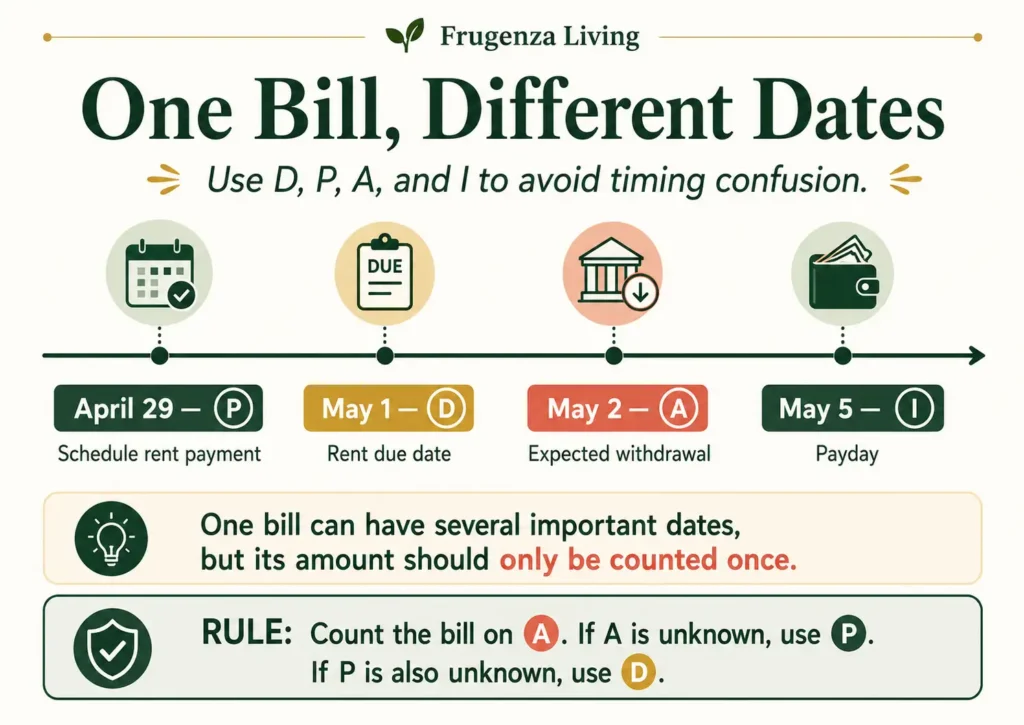
A calendar becomes misleading when a provider deadline, planned action, automatic charge, and payday look identical.
Use text markers as well as color:
- D — Due date: the provider’s deadline.
- P — Planned payment or action date: when you intend to schedule, authorize, mail, or review a payment.
- A — Expected withdrawal or charge date: when a bank debit, card charge, or other automatic transaction is expected.
- I — Confirmed income or payday: income expected on a known date.
The dates may match, but often do not. An expected withdrawal or charge date is not proof that payment completed.
Enter Confirmed Income Dates Before Bills
Paydays create the reference points for the calendar. Enter them first so timing gaps become visible immediately.
Weekly pay may create four or five markers; biweekly pay usually creates two, sometimes three. Semimonthly pay uses two set dates, while monthly pay creates one.
For irregular income, enter only dates and amounts that are confirmed. Do not build the month around a hoped-for client payment.
Add Bills and Calculate the Weekly Planning Load
Add fixed bills first, then variable bills using a clearly labeled estimate. Include non-monthly obligations only when they fall inside the 42-day view.
Weekly planning bill load = the total planning amounts assigned to bills expected to affect the household during that week.
Count each bill only once. Use its expected withdrawal or charge date when known. If that date is unknown, use the planned payment date. If neither is available, use the due date. Keep the other markers visible, but do not add the amount again.
Exclude groceries, gasoline, dining, and ordinary spending unless invoiced as recurring obligations. Use one currency. Flag the heaviest week, bills before the next income, and unknown amounts.
Include your bill calendar in a monthly budget reset routine so you can update changed due dates, amounts, and canceled subscriptions.
Worked Calendar Example
- Apr 26 — I Paycheck
- Apr 29 — P Schedule rent
- May 1 — D Rent $900
- May 2 — A Expected rent withdrawal
- May 3 — D Internet $60
- May 5 — I Paycheck
The $900 rent is counted once in the weekly planning total on May 2, its expected withdrawal date—not again on April 29 or May 1.
A bill calendar only works when you first create a complete list of your monthly bills, including subscriptions and automatic payments.
Six-Week Bill Calendar Builder
Use six consecutive seven-day weeks. The calendar end date should be 41 days after the start date, creating a 42-day view that includes at least the first five days of the following month.
Record confirmed income in each week’s income field. Use the event area for D, P, and A bill markers, with one dated event per line.
This is a manual worksheet. It does not calculate, save, or submit information. Entries may disappear after refresh or when the page closes. Do not enter account numbers, card numbers, passwords, or other sensitive information. Use one currency throughout.
Count each bill once. Assign its planning amount to A when the expected withdrawal or charge date is known, otherwise to P, and otherwise to D. Other markers stay visible but do not add the amount again. Include one reasonable variable-bill estimate when available. If no useful estimate exists, list the amount as unknown and do not treat it as zero.
Complete all totals manually. To print, use your browser’s Print command and review the preview because layouts can differ.
Provider deadline
Schedule, send, or review
Expected automatic transaction
Confirmed payday or deposit
First Five Days of Next Month
This reviews bills already shown in Week 6; it is not an additional seventh week. Do not add the same bill to the calendar total twice.
A bill due before the first payday of next month may need to be prepared from income received during the current month.
Manual Timing Summary
Complete these fields after reviewing all six weeks. The boundary card is already represented in Week 6.
The First-Payday Gap
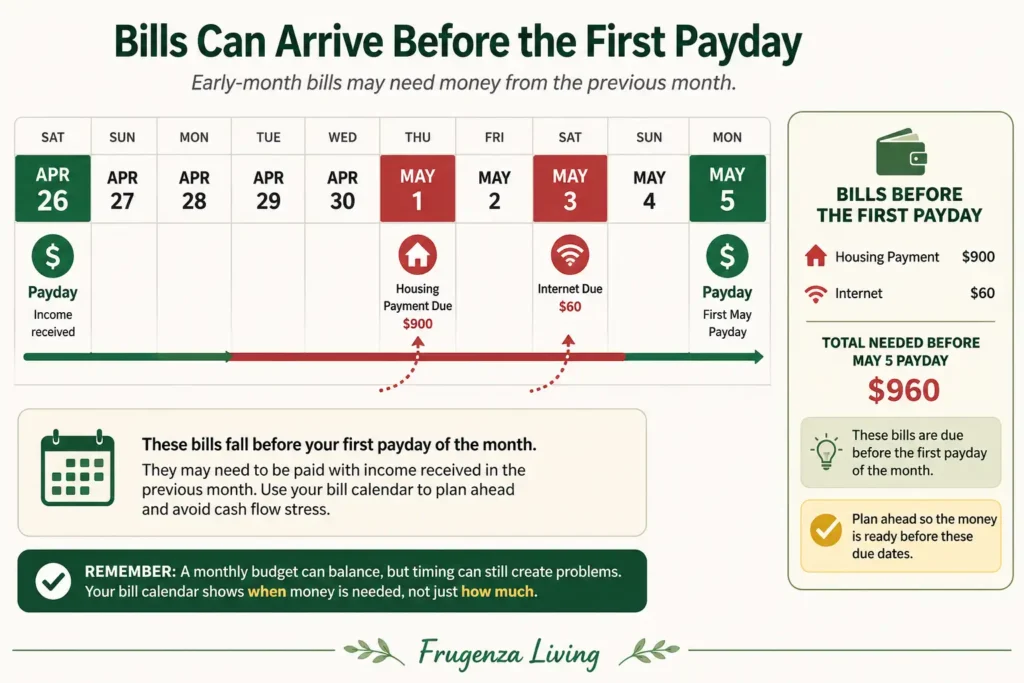
Suppose a housing payment of $900 is due on the first, internet of $60 is due on the third, and the first payday is the fifth. The calendar reveals $960 of obligations before that payday even if the month is affordable overall.
That amount may need to come from the previous month’s income. You could also contact providers early or ask about another due date. Do not assume approval or delay a required payment without understanding the terms.
A calendar shows when the payment is due, but you also need a plan to save for bills due every three months.
Keep Automatic and Variable Bills Visible
Place an automatic payment on its expected withdrawal or charge date when known, while keeping a separate due-date marker if needed. The CFPB explains that an automatic bank debit differs from recurring bill-pay initiated by a bank, so verify which arrangement you use.
For a variable bill, include one reasonable planning estimate and label it. Replace it when the statement arrives. If no useful estimate exists, keep the bill visible under “Variable amount still unknown.”
When Due Dates Shift and How to Anticipate It Before the Calendar Is Wrong
A bill calendar is only as accurate as the dates inside it.
Most due dates stay consistent from month to month. But two patterns cause predictable shifts that can make a calendar misleading before the month even starts — and neither requires a biller error to occur.
Pattern 1: The due date lands on a weekend or public holiday.
When a bill’s standard due date falls on a Saturday, Sunday, or recognized holiday, different billers handle it differently.
Some move the effective due date to the preceding Friday — meaning your payment is expected earlier than the calendar shows.
Others move it to the following Monday or the next business day — meaning you have slightly more time, but your calendar shows a date that no longer matches when the biller expects action.
A small number of billers keep the stated due date unchanged and process it on the next available business day without penalty, but this varies by provider and is not safe to assume.
Before entering any due date that falls on a weekend or holiday, check the biller’s terms or the current statement to confirm which direction they shift and by how many days. Enter the adjusted date as the D marker — not the nominal due date from memory or last month’s statement.
Pattern 2: The biller changes the billing cycle quietly.
This happens less often but is harder to detect. A provider may shift your billing cycle by a few days after a system update, after a payment arrangement, or when an account renews. The new due date appears on the current statement but does not match what was on file.
When the shift is small — three to five days — it is easy to miss unless the statement is checked directly rather than assumed from memory or last month’s calendar.
The place this most often creates a problem on a bill calendar is at the beginning or end of a month. A due date that moved from the 3rd to the 28th, or from the 28th to the 3rd, changes which weekly planning load it belongs to, which paycheck it should be funded from, and whether it appears in the first-payday gap window.
One practical rule for both patterns:
When setting up or updating a week that contains a due date, verify the date against the current statement or biller account — not from memory, not from a previous month’s calendar entry, and not from a general recollection of when that bill “usually” comes.
This takes one extra minute per bill during weekly review. It prevents the calendar from showing a timing picture that no longer matches the actual billing cycle.
What to Do When Bills Cluster Together
When several bills land together, you might prepare money earlier, move an optional payment date where terms allow, reconsider a nonessential renewal, or prepare separately for a large predictable cost.
The CFPB’s 2025 Request a Change in Your Bill Due Date worksheet notes that changes are not guaranteed and may affect the next bill. Confirm any new date and billing effect with the provider.
Maintain the Calendar With One Weekly Review
Choose one review day. Add new statements, update estimates, check changed withdrawal or charge timing, confirm the next income date, and inspect the beginning of the following month. Then recalculate the next weekly planning load.
Common Bill-Calendar Mistakes
Entering Bills Without Paydays
Add confirmed income first.
Counting One Bill Under Several Markers
Use A, otherwise P, otherwise D for the amount, and count it once.
Ending on the Last Day of the Month
Include at least the first five days of the next month.
Hiding Variable Bills
Record a labeled estimate or mark the amount unknown.
Treating Autopay as Completed
Show expected timing without claiming the payment finished.
Adding Every Spending Category
Keep ordinary spending in the budget unless it is an invoiced recurring obligation.
Build the Calendar Around the Next Payday
A useful bill calendar connects due dates with confirmed paydays, planned actions, expected withdrawals or charges, weekly clusters, and the next month’s opening days.
Enter the next confirmed payday, then add every bill due before it. Assign each bill to one weekly total, complete the remaining weeks, and review the calendar consistently.
This article provides general educational information, not individualized financial, legal, debt, credit, or payment advice. Due dates, processing times, billing terms, and available arrangements vary by provider and location.

Read about Jeffi and Frugenza Living
- How to Budget a 10-Month Salary Over 12 Months - October 16, 2026
- Pet Adoption Budget Checklist: What You Still Need to Pay - October 16, 2026
- Proportional Bill Split Calculator for Two Incomes - October 15, 2026