I used to think tracking expenses meant writing down every single thing I spent.
Every coffee, every small purchase, every random transaction.
I tried doing that for a few days, but it quickly became exhausting. The problem wasn’t that tracking expenses didn’t work. The problem was that I made it too detailed too early.
That’s where many beginners get stuck. They think expense tracking has to be perfect, technical, or app-based. In reality, the easiest way to track expenses is usually the one you can repeat without feeling stressed.
If you want to track expenses easily, you don’t need a complicated system. You need a simple habit that helps you notice where your money actually goes.
Key Takeaways
- You don’t need to track every detail—focus on awareness over perfection
- Simple methods like checking your bank app or using notes are often more effective
- Consistency matters more than tools—keep it under 5 minutes a day
Why Tracking Expenses Feels Hard
Tracking expenses often feels hard because people start with too much detail.
They try to record every purchase, separate everything into categories, and review every number perfectly. That might work for a very organized person, but for most beginners, it creates pressure.
When I first tried tracking every expense, I started strong. After a few days, I forgot one small purchase. Then another. Eventually, the whole system felt broken, so I stopped.
That was the wrong approach.
Expense tracking should not feel like homework. It should feel like a quick check-in with your money.
What Easy Expense Tracking Actually Means
Easy expense tracking means knowing where your money goes without tracking every small detail perfectly.
The goal is not to create a perfect financial report. The goal is to build awareness.
If you can notice your biggest spending patterns, you already have enough information to make better decisions. You don’t need to know every exact number to realize that food delivery, online shopping, or small daily purchases are draining your budget.
This mindset makes tracking much easier. You are not trying to control everything. You are simply trying to see clearly.
If you’re new, it helps to understand basic budgeting tips before tracking everything in detail.
The Simplest Way to Track Expenses Without Stress
The simplest way to track expenses is to focus on two things:
- awareness over accuracy
- consistency over detail
Instead of tracking every dollar, track the expenses that repeat often or surprise you. Instead of checking your money all day, review it once a day or once a week.
For example, if you notice that most of your money disappears through food, transport, and small online purchases, that is already useful information. You don’t need a complex spreadsheet to understand the pattern.
This is why simple expense tracking methods often work better than advanced systems. They are easier to repeat.
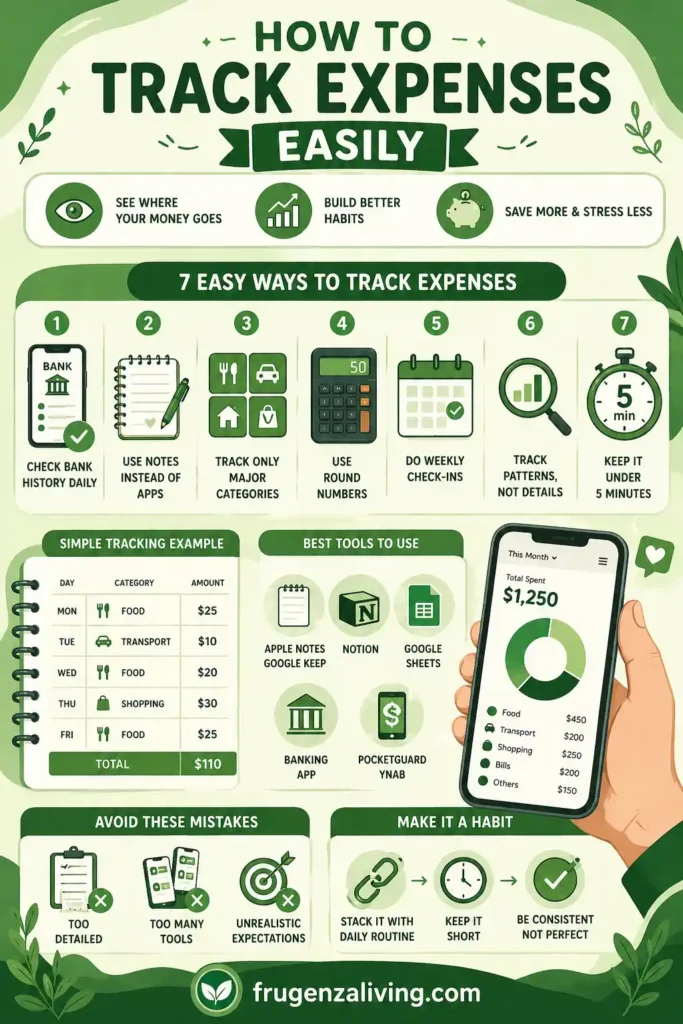
7 Easy Ways to Track Expenses
1. Check Your Bank History Daily
This is one of the easiest methods because your bank already records your spending.
You don’t need to write everything manually. Just open your banking app once a day and look at your recent transactions. It usually takes less than two minutes.
The point is not to judge yourself. The point is to stay aware. When you see your spending regularly, you naturally become more careful before making the next purchase.
Tracking becomes more useful when you build better spending habits alongside it.
2. Use a Notes App Instead of a Budgeting App
If budgeting apps feel overwhelming, use a simple notes app.
Apple Notes, Google Keep, Notion, or even a basic phone note can work well. You can create a short daily note like this:
Monday
Food: $25
Transport: $10
Shopping: $18
That is enough.
You don’t need categories, charts, or complicated formulas at the beginning. A simple note helps you see your spending without turning it into a big task.
Tracking becomes more useful when you follow simple budgeting methods that give your spending a clear structure.
3. Track Only Major Categories
Many beginners fail because they create too many categories.
Instead of tracking 15 different things, start with 3–4 main categories:
- food
- transport
- bills
- flexible spending
This keeps the process simple. If food spending is your biggest issue, you will notice it quickly. If random shopping is the problem, it will become obvious after a few days.
Tracking fewer categories makes the habit easier to maintain.
4. Use Round Numbers
Exact numbers can make tracking feel tiring.
If you spent $18.75, write $20. If groceries cost $47.30, write $50.
This is not perfectly accurate, but it is accurate enough to understand your habits. For beginners, that matters more.
Once you start noticing patterns, it becomes easier to reduce your daily expenses without making drastic changes.
Round numbers reduce friction. The easier it feels, the more likely you are to keep doing it.
5. Do a Weekly Spending Check-In
Daily tracking is helpful, but it is not required.
A weekly check-in can work just as well, especially if you are busy. Pick one day each week—Sunday evening, Friday night, or payday—and review your transactions.
Ask yourself:
- Where did most of my money go?
- What expense surprised me?
- What did I notice about my spending this week?
This turns expense tracking into a simple reflection habit instead of a stressful daily task.
6. Track Patterns, Not Every Detail
This is the part most people miss.
Expense tracking is not only about numbers. It is about behavior.
You might notice that you spend more when you are tired, bored, stressed, or hungry. You might realize that most impulse purchases happen at night. You might see that small purchases feel harmless but repeat too often.
This habit becomes more effective when you manage your money effectively in daily situations.
Those patterns are more valuable than exact numbers because they show you why spending happens.
Once you understand the pattern, changing it becomes easier.
7. Keep Tracking Under 5 Minutes
If expense tracking takes too long, you will stop doing it.
Set a simple rule: keep it under 5 minutes.
That means no complicated formatting, no perfect categories, and no overthinking. Just check, write, notice, and move on.
A small habit repeated consistently is more powerful than a perfect system you abandon after one week.
Turn Tracking Into a Spending Pattern Summary
Tracking expenses is only useful if it helps you understand your spending pattern. After your weekly check-in, do not stop at the numbers. Turn what you found into one short spending summary.
Use this simple format:
Most of my flexible spending went to ____. The expense that surprised me was ____. Next week, I will pay closer attention to ____.
For example:
Most of my flexible spending went to food delivery. The expense that surprised me was small online purchases. Next week, I will pay closer attention to ordering food when I am tired.
This makes expense tracking easier to use because you are not just collecting transactions. You are translating them into a clear lesson. A list of numbers can feel overwhelming, but one short summary tells you what to improve next.
You do not need to analyze every detail. If you can identify one repeated category, one surprising expense, and one habit to watch next week, your tracking is already doing its job.
A Real-Life Example of Simple Expense Tracking
Here is what simple tracking might look like for one week:
| Day | Main Spending | Amount |
|---|---|---|
| Monday | Food | $25 |
| Tuesday | Transport | $10 |
| Wednesday | Food | $20 |
| Thursday | Shopping | $30 |
| Friday | Food | $25 |
This example is simple, but it already shows a pattern. Food appears several times in one week. That means food spending is probably worth reviewing first.
You don’t need a perfect financial dashboard to notice that. A small table or note is enough.
Best Tools to Track Expenses Easily
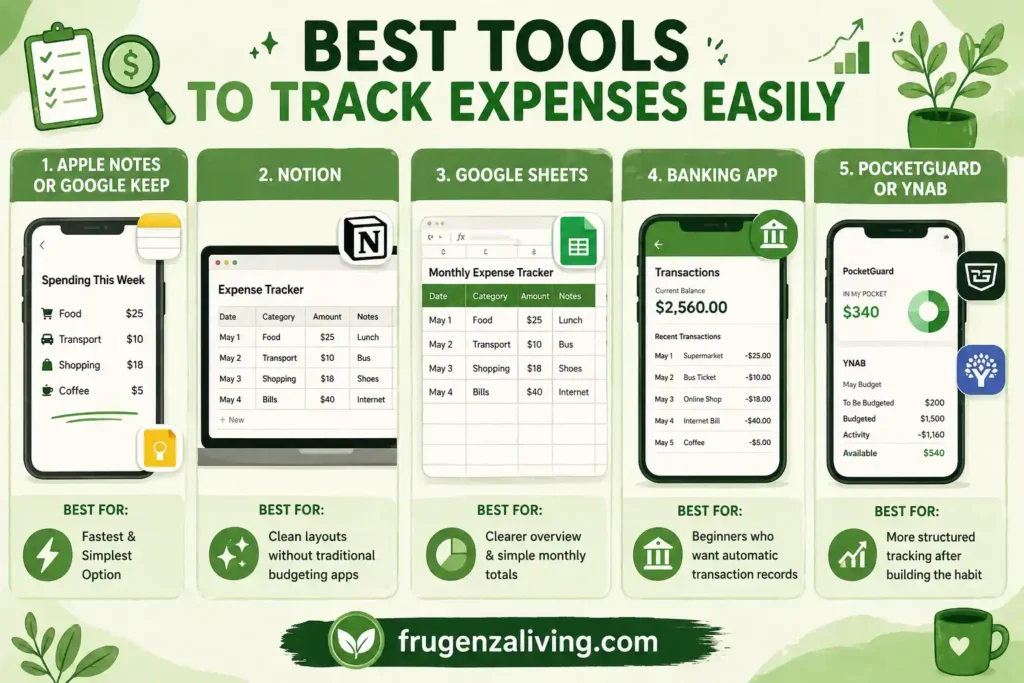
You don’t need expensive software to track expenses. The best tool is the one you will actually use.
Apple Notes or Google Keep
These are great for quick tracking. You can create a simple note titled “Spending This Week” and add short entries each day.
Best for: people who want the fastest and simplest option.
Notion
Notion works well if you like a slightly more organized system. You can create a simple table with columns like date, category, amount, and note.
Best for: people who like clean layouts but don’t want a traditional budgeting app.
Google Sheets
Google Sheets is useful if you want a little more structure. You can use a simple expense tracker template or create your own with columns such as:
- Date
- Category
- Amount
- Notes
Best for: people who want a clearer overview and simple monthly totals.
Banking App
Your banking app is often the easiest place to start because it already records your transactions. You only need to review them regularly.
Best for: beginners who don’t want to manually write everything down.
PocketGuard or YNAB
If you want more automation later, tools like PocketGuard or YNAB can help. But they are optional, not required.
Tools like PocketGuard or YNAB are more advanced and usually work better after you build a basic tracking habit first.
Common Mistakes That Make Expense Tracking Fail
The first mistake is tracking too much too soon.
If you try to record every small purchase perfectly, tracking becomes stressful. Start with the biggest patterns first.
The second mistake is using too many tools. If you use a budgeting app, spreadsheet, notebook, and notes app at the same time, the system becomes confusing.
The third mistake is expecting instant results. Expense tracking is not magic. It works because it creates awareness, and awareness changes behavior over time.
How to Make Expense Tracking a Daily Habit
The easiest way to build the habit is to connect it to something you already do.
For example, check your spending after dinner, before bed, or after checking your messages in the morning. This is called habit stacking, and it makes the new habit feel less forced.
You can also set a very small goal. Instead of saying, “I will track everything forever,” say, “I will check my spending for three days.”
That feels easier. And once you start, continuing becomes more natural.
How Expense Tracking Helps You Understand Your Spending
Expense tracking is not about building a budget.
It is about understanding your spending first.
When you clearly see where your money goes, you start making better decisions naturally—without needing a complex system.
This is why tracking expenses is often the first step before budgeting. It builds awareness, which makes everything else easier later.
FAQ: How to Track Expenses Easily
What is the easiest way to track expenses?
The easiest way to track expenses is to check your bank transactions regularly or write down rough spending in a notes app. You do not need a complicated system. The goal is to notice patterns and understand where your money goes.
Do I need an app to track expenses?
No, you do not need an app to track expenses. Apple Notes, Google Keep, Notion, Google Sheets, or your banking app can be enough. The best tool is the one you can use consistently without stress.
How often should I track my expenses?
You can track expenses daily or weekly. Daily tracking builds stronger awareness, but weekly check-ins are easier for busy people. The most important thing is consistency.
Should I track every small purchase?
No, beginners do not need to track every small purchase perfectly. It is usually better to focus on repeated spending patterns and major categories first, such as food, transport, bills, and flexible spending.
Why do I fail at tracking expenses?
Most people fail because they make tracking too detailed or too time-consuming. When the system feels like extra work, it becomes easy to quit. Keeping the process simple makes it easier to continue.
Ending
Tracking expenses does not need to be complicated.
You do not need a perfect spreadsheet, a paid app, or a detailed financial system. You only need a simple way to notice where your money goes.
Start with one habit.
Check your bank history, write a few notes, or review your spending once a week.
Once you understand your spending, budgeting becomes much easier.

The ideas shared here come from real-life experience and practical habits that actually work.
→ Read more about Jeffi
- No Spend Month Challenge for Beginners: A 30-Day Plan - September 24, 2026
- Low Buy Month Challenge: Realistic Rules for 30 Days - September 23, 2026
- How to Stop Buying Groceries You Already Have - September 20, 2026