A $120 annual subscription looks like a $10 monthly expense when you divide it by 12. That calculation is useful—until the renewal is four months away and you have only $20 saved.
An annual subscription sinking fund should answer a more immediate question: How much cash needs to be reserved between now and the next renewal?
That amount can be very different from the subscription’s long-run monthly equivalent.
Annual price ÷ 12 is the mature funding pace. It is not always what you need to save today.
This guide begins after you already know which annual services you are planning around. If you still need to organize monthly, annual, trial, and mixed billing cycles, start with this guide to budgeting for subscriptions.
Quick answer: For each annual subscription you may renew, subtract what is already reserved from the expected renewal charge. Divide the remaining gap by the funding intervals left before renewal. Annual cost ÷ 12 is a useful long-run baseline, but a sinking fund started mid-cycle may temporarily need a higher contribution.
The Number You Need Today May Be Higher Than Annual Cost ÷ 12
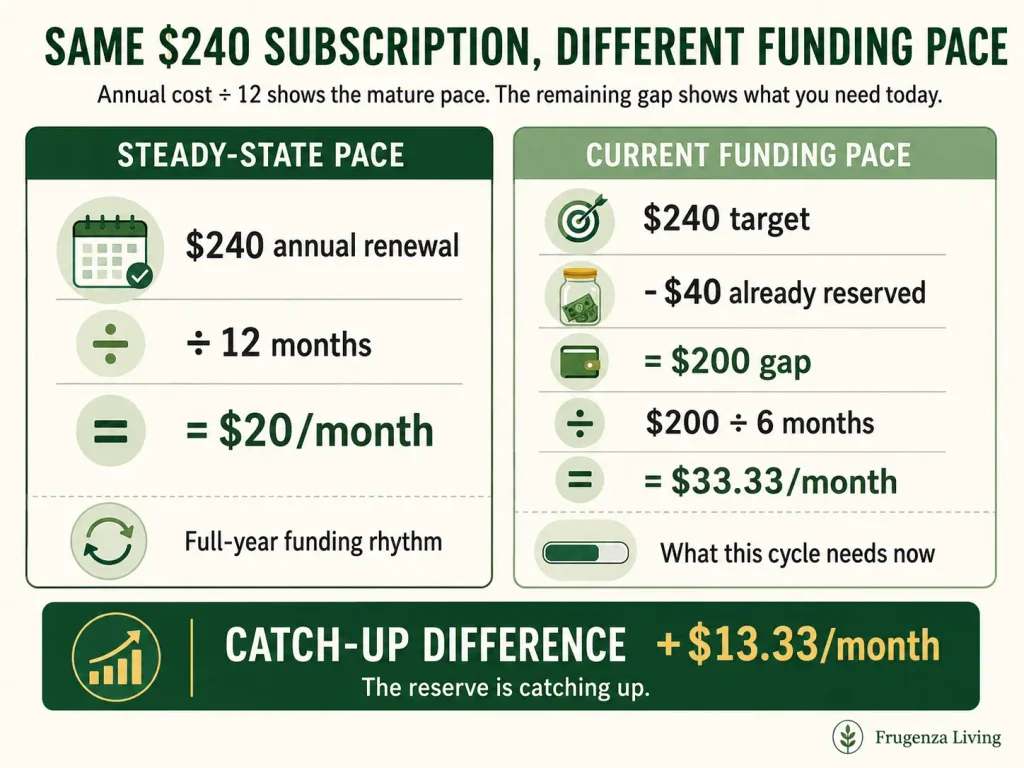
Suppose a software subscription is expected to renew for $240.
Its steady monthly funding pace is:
$240 ÷ 12 = $20 per month
That works well when a new cycle begins with roughly a full year available.
Now suppose the renewal is six months away and you have already reserved $40.
Remaining Renewal Gap = Expected Renewal − Already Reserved
$240 − $40 = $200
Then:
Current Funding Pace = Remaining Gap ÷ Funding Intervals Remaining
$200 ÷ 6 = $33.33 per month
The service did not suddenly become a $33.33 monthly subscription. Your reserve is catching up.
Keep two numbers separate:
Steady-State Pace = Expected Annual Renewal ÷ Funding Intervals Per Year
Current Funding Pace = Remaining Renewal Gap ÷ Funding Intervals Remaining
Then compare them:
Catch-Up Difference = Current Funding Pace − Steady-State Pace
A positive difference means the current cycle temporarily requires more than the mature pace. A negative difference means existing reserves and timing make this cycle easier to fund; it is not “savings.”
Begin With Known Annual Renewals, Not Another Audit
This page is not meant to rediscover every recurring charge on your statements.
Start with annual subscriptions or memberships that you can identify and reasonably estimate. For each one, record:
- expected renewal amount;
- amount already reserved;
- funding intervals remaining;
- next renewal date, if useful for your records;
- how the reserve should currently be treated.
Use the best renewal-price information available. A provider renewal notice or account page is usually more useful than blindly copying last year’s charge.
If you still need to identify unknown charges, verify merchants, or decide what deserves another cycle, use the Subscription Audit Checklist first.
The audit decides what should happen to the subscription. This sinking fund decides what should happen to the cash reserve.
Fund the Option to Renew—Not an Automatic Renewal
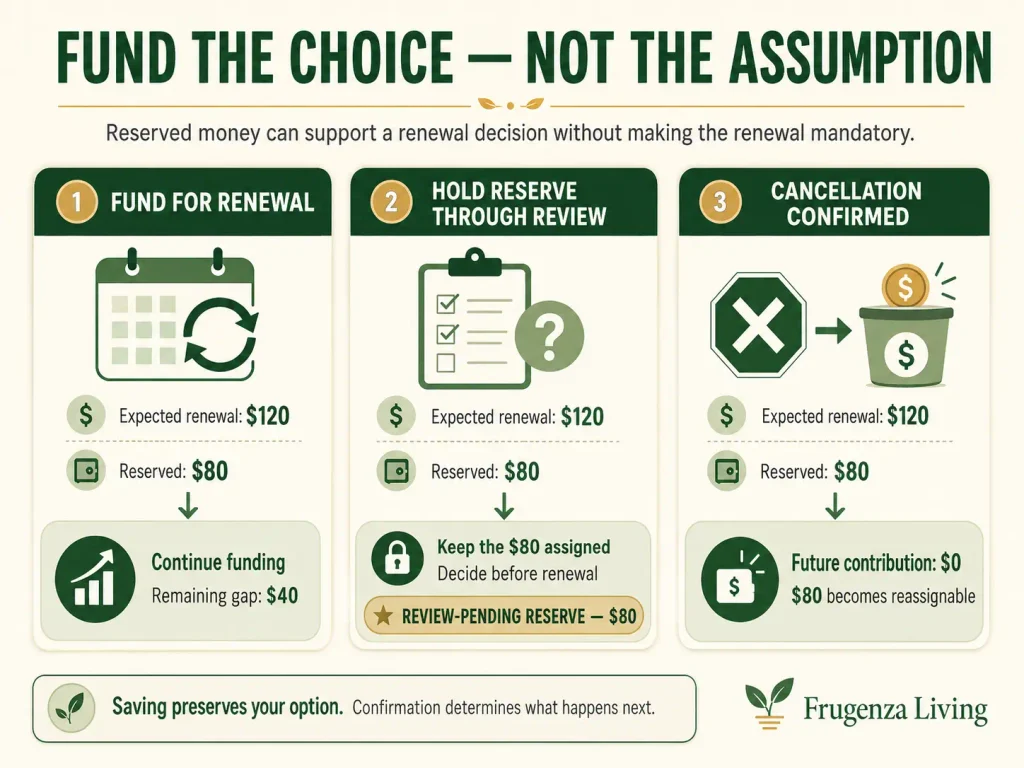
Annual subscriptions are different from many predictable bills because paying them usually involves a choice. Your reserve should preserve that choice.
Fund for Renewal
Use this when you currently expect the service to continue. Build the reserve toward the expected renewal charge.
Hold Reserve Through Review
Use this when you have not made the final renewal decision.
If $80 is already saved toward a $120 service, that $80 is Review-Pending Reserve. It remains assigned while you decide, but it is not yet committed to the provider.
Saving for a renewal preserves your choice. It does not make the renewal mandatory.
Stop Funding — Cancellation Confirmed
Use this only after the expected renewal has actually been resolved.
Future required contribution becomes $0. Money previously assigned to that subscription becomes reassignable reserve, not “excess” and not automatically available before cancellation is confirmed.
Annual Subscription Renewal Reserve Planner
Use this planner to compare your current required funding pace with your steady-state pace, identify review-pending money, and separate reserves released by confirmed cancellations.
Important: changing the funding cadence does not automatically convert the “Funding Intervals Remaining” values in each row. If you switch from monthly to biweekly, update those intervals to match your real funding opportunities.
The renewal date is optional and used for your records only. The planner does not infer paycheck counts from it.
Frugenza Living Budget Tool
Annual Subscription Renewal Reserve Planner
See what your renewal reserves require now—not only what they average over a full year.
Funding intervals: enter the actual number of funding opportunities remaining before each renewal. Changing cadence does not convert those row values automatically.
Renewal date: optional and for your records only. The planner does not calculate paycheck counts from the date.
Planning tool only. Verify renewal prices, dates, terms, and cancellation status directly with the provider. Entries stay in your browser and are not transmitted by this tool.
Example: Why $53 a Month Becomes $79.67 for This Renewal Cycle
Consider Leah, a fictional household budgeter. All amounts below are illustrative.
She has four annual subscriptions she may renew:
- Cloud Storage — $120;
- Fitness Membership — $180;
- Creative Software — $240;
- Media Membership — $96.
The combined active annual target is $636.
Its mature monthly pace is:
$636 ÷ 12 = $53 per month
But those renewals are not all twelve months away.
Cloud Storage has $20 reserved and four funding intervals left:
($120 − $20) ÷ 4 = $25
Fitness Membership:
($180 − $60) ÷ 9 = $13.33
Creative Software:
($240 − $40) ÷ 6 = $33.33
Media Membership:
($96 − $32) ÷ 8 = $8
Using the unrounded values before display rounding, the current total is:
about $79.67 per month
Compared with the mature $53 pace:
$79.67 − $53 = about $26.67 more per month
That extra $26.67 is temporary catch-up, not a permanent increase in subscription spending.
Leah keeps the Media Membership under review, so its $32 remains assigned. She has also confirmed cancellation of a separate $75 Learning App with $30 reserved; its future contribution becomes $0 and the $30 becomes reassignable.
When a Renewal Price Changes, Update the Gap
Suppose you planned for a $120 annual renewal and already reserved $90.
A legitimate renewal notice now shows the next charge will be $132.
Updated Funding Gap = Updated Renewal Amount − Already Reserved
$132 − $90 = $42
Only the remaining gap changes.
Avoid adding an arbitrary 5% or 10% buffer to every service. Use the best information available: a renewal notice, provider account, current retained plan price, or last actual charge when nothing better is available.
The Federal Trade Commission’s consumer guidance on auto-renewals advises consumers to review renewal terms and charges rather than assuming the next cycle will match their expectations.
Cancellation Releases Cash Only After the Renewal Is Resolved
Writing “cancel” in a budget does not stop a provider from billing you. That is why this planner uses Stop Funding — Cancellation Confirmed rather than Plan to Cancel.
Once cancellation is confirmed:
- future sinking-fund contributions stop;
- the subscription leaves the active renewal target;
- money assigned to it becomes reassignable.
Until then, do not count that reserve as money available for another purpose.
The audit process determines whether the subscription should continue. The reserve system responds after that decision state is clear.
After a Renewal, the Cycle Becomes Easier
Once you intentionally renew:
- Record the actual provider charge.
- Treat the completed reserve as used for that renewal.
- Record the next expected renewal date.
- Use the new actual price as the next planning amount unless better information becomes available.
- Begin building the next reserve.
For a $240 renewal with roughly twelve months before the next one:
$240 ÷ 12 = $20 per month
Now the steady-state and current funding pace can move much closer together. This is where the simple /12 formula is most useful.
If the service is still under review or you no longer expect to keep it, do not mechanically restart contributions.
A New Annual Subscription Is a Different Problem
Creating a sinking fund today cannot retroactively make today’s annual purchase affordable.
If a new service costs $180 today, today’s $180 still needs to fit the current budget. After that charge is covered, you can start reserving cash for the next renewal.
Whether annual billing is better than monthly billing is a broader subscription-budgeting decision, not part of this renewal-reserve calculation.
One Reserve Account Can Hold Several Subscriptions
You do not need a separate savings account for every annual service.
One Annual Subscription Reserve can work if your records clearly assign each dollar.
If a savings account contains $500 and your ledger assigns $120 to software, $150 to fitness, $80 to storage, and $150 to other memberships, the full $500 already has owners.
One dollar cannot be reserved for two renewals at the same time.
If annual subscriptions compete with vehicle registration, school costs, insurance, or other predictable yearly expenses, an annual expenses checklist can help you see those obligations together.
For ongoing contributions and withdrawals, a sinking fund tracker template can keep assigned balances clear even when several reserves share one savings account.
Do Not Count Reserve Transfers as Subscription Spending Twice
Moving $20 from checking into your own subscription reserve is not another subscription purchase. It is a transfer of your own money.
If you transfer:
$20 × 12 = $240
and the provider later charges:
$240
the subscription did not cost $480.
The provider charge represents actual subscription spending. The transfers show how you prepared the cash.
This distinction keeps spending reports accurate and the reserve focused on liquidity.
Frequently Asked Questions
How much should I save monthly for annual subscriptions?
Annual renewal cost ÷ 12 gives a useful mature monthly baseline. If the next renewal is closer, subtract what is already reserved and divide the remaining gap by the funding intervals still available.
What if an annual subscription renews before I have enough saved?
Calculate the remaining gap against the funding opportunities left. If that contribution does not fit your budget, reconsider whether the renewal fits your priorities instead of assuming the sinking fund makes it affordable.
Should I fund a subscription if I am not sure I will renew it?
You can hold the reserve through the review period. Keeping the money available preserves your ability to decide based on value rather than on whether cash happens to be available.
What happens to sinking-fund money after I cancel?
After cancellation is genuinely confirmed and the expected renewal is resolved, future contributions can stop and the reserve can be intentionally reassigned.
The Bottom Line
Do not build an annual subscription sinking fund by blindly dividing every yearly charge by 12.
Start with the next annual service you may actually keep:
Expected renewal → Already reserved → Funding intervals remaining
Then calculate the remaining gap.
If today’s required contribution is higher than the steady-state pace, your subscriptions have not necessarily become more expensive. Your reserves may simply be catching up.
Fund the ability to renew—not the assumption that you will renew.
Once a renewal cycle is resolved and the next one begins with enough time, the simple annual-price-divided-by-12 rhythm becomes much easier to maintain.
Educational note: This guide provides general budgeting information. Verify subscription pricing, renewal dates, provider terms, and cancellation status directly with the relevant provider.
Methodology Note
The planner treats Fund for Renewal and Hold Reserve Through Review rows as active renewal candidates. Existing reserves are applied only to their assigned renewal, overfunding is separated as unassigned excess, and confirmed cancellations are excluded from future funding while their reserved cash is reported separately as reassignable. Funding intervals are entered manually so the tool does not make assumptions about individual paycheck schedules.

Read about Jeffi and Frugenza Living
- Proportional Bill Split Calculator for Two Incomes - October 15, 2026
- How to Split Grocery Bills With Roommates - October 14, 2026
- First Apartment Kitchen Essentials on a Budget - October 13, 2026