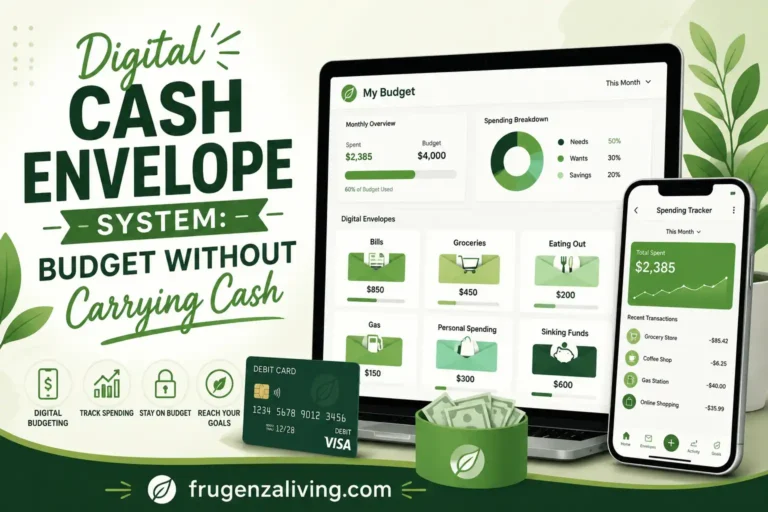
Cash envelopes can be helpful, but carrying physical cash is not realistic for everyone.
Maybe you pay most bills online. Maybe you use debit cards, autopay, mobile banking, food delivery apps, online carts, or digital subscriptions. That does not mean the envelope method is useless. It just means the system needs to work without paper envelopes.
A digital cash envelope system keeps the same basic idea: every spending category gets a clear limit. The difference is that your envelopes live inside an app, spreadsheet, bank bucket, notes file, or separate account instead of your wallet.
Some people call this digital cash stuffing, but the point is the same: separate your money into clear spending limits before it disappears into one big balance.
This is general budgeting education, not professional financial advice.
Quick Answer: What Is a Digital Cash Envelope System?
A digital cash envelope system is a cashless budgeting method where you divide money into digital categories such as groceries, eating out, gas, bills, sinking funds, and personal spending. You can use a budgeting app, bank buckets, spreadsheet, or notes app. The goal is the same as cash envelopes: each category has a clear spending limit before you spend.
Why Digital Envelopes Are Different From Cash Envelopes
Physical cash envelopes create friction.
If your eating out envelope is empty, you feel it immediately. With debit cards and online checkout, the limit is easier to ignore. Your bank balance may still look healthy, even if one category is already overspent.
That is why digital envelope budgeting needs more visibility.
A digital cash envelope system is useful if you:
- Do not like carrying cash
- Use debit cards for most purchases
- Shop online often
- Share a budget with a partner
- Use autopay for bills
- Want envelope budgeting without a physical binder
A digital envelope does not fail because it is digital. It fails when the limit is invisible.
If you want the physical version first, you can read this guide to the cash envelope system for beginners. But if your money life is mostly cashless, digital envelopes may fit better.
The Digital Envelope Rule
Digital envelopes work best when they stay C.L.E.A.R.
Use the C.L.E.A.R. Method:
The tool matters less than the routine. A digital envelope system is not strong because it has many features. It is strong because you check it before spending.
Your First Digital Envelope Setup in 20 Minutes
You do not need to build a perfect system before you start.
A simple first setup can look like this:
- Choose one tool: app, spreadsheet, notes, or bank buckets.
- Create five starter envelopes: bills, groceries, eating out, gas, and personal spending.
- Add one small buffer envelope.
- Assign money to each category before spending.
- Track your next purchase immediately.
- Set a weekly reminder to review what is left.
This quick setup matters because many digital budgets fail from overcomplication. Start with a system you can actually check before buying something.
Step 1: Choose Your Digital Envelope Tool
You do not need the most advanced budgeting app to start.
A good digital envelope tool is the one you will actually update.
Common options include:
- A budgeting app
- Bank account buckets or spending buckets
- A spreadsheet envelope budget
- A notes app with category balances
- Separate checking accounts for major spending groups
This can be as simple as virtual cash envelopes in a spreadsheet, spending buckets in your bank, or a manual digital envelope tracker.
If this system feels too detailed, you can compare it with other simple budgeting methods before choosing one.
Which Digital Envelope Tool Should You Choose?
Choose an app if you want automation and do not mind connecting accounts or updating categories regularly.
Choose a spreadsheet if you want full control and do not mind entering transactions yourself.
Choose bank buckets if you want your money separated inside your banking setup.
Choose a notes app if you want the simplest manual system and only need a few categories.
Choose a shared app or shared spreadsheet if you budget with a partner and both of you need to see the same numbers.
The wrong tool is the one that looks impressive but takes too long to maintain.
Step 2: Build Digital Envelope Categories That Match Real Spending
Digital envelopes work better when you separate your money into layers.
Do not mix bills, flexible spending, and sinking funds into one messy category.
Use three layers:
Layer 1: Must-pay bills
- Rent or mortgage
- Utilities
- Insurance
- Debt minimums
- Phone and internet
Layer 2: Flexible spending
- Groceries
- Eating out
- Gas or transportation
- Personal spending
- Household items
Layer 3: Sinking funds
- Car maintenance
- Annual subscriptions
- Gifts
- Holidays
- Clothing
- Medical costs
- Home repairs
Digital envelopes work better when bills, flexible spending, and sinking funds are not mixed together.
This is where cashless envelope budgeting can be stronger than physical cash. You can keep autopay bills digital, track online purchases, and still give every category a spending limit.
Once your categories are ready, the next step is to split your income for budgeting across each digital envelope.
Step 3: Fund Your Envelopes After Income Arrives
Do not spend first and organize later.
When income arrives, give your money a job before your card starts spending. This is similar to a zero-based digital envelope budget: money is assigned to categories before it becomes available for random spending.
A simple funding order looks like this:
For a deeper explanation of electronic envelope budgeting, Actual Budget explains the idea of assigning money to categories before spending in its envelope budgeting guide.
Step 4: Use the Visible Before Spend Rule
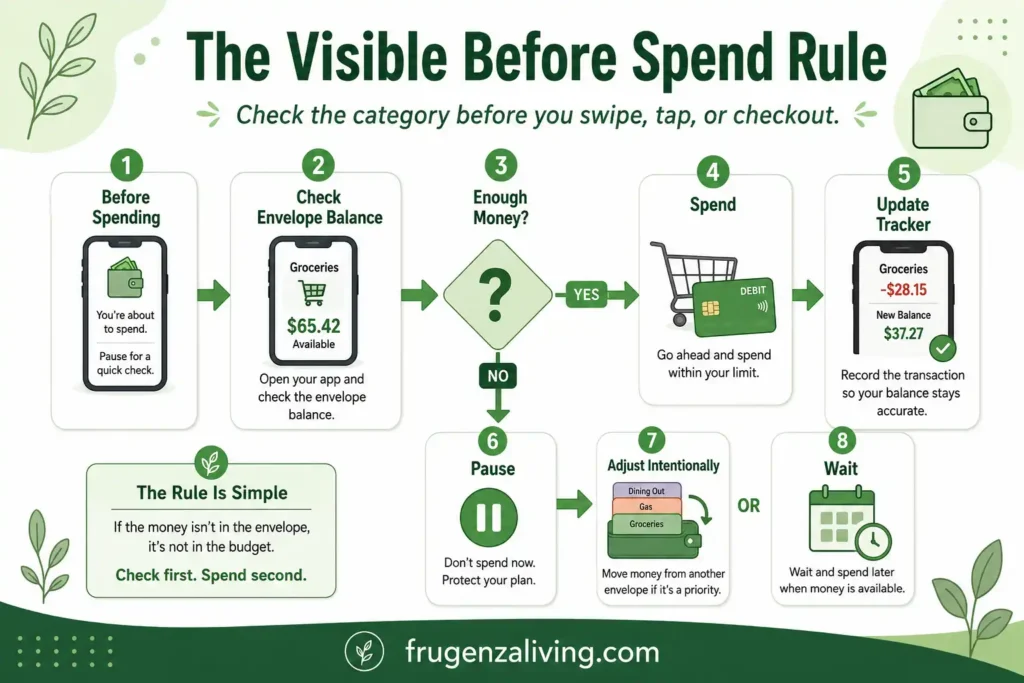
The most important rule for digital envelopes is simple:
If you cannot see the category balance before spending, the envelope is not working yet.
This is the Visible Before Spend Rule.
Before you swipe, tap, or check out online, check the envelope. If the category has enough money, spend and update your tracker. If it is almost empty, pause before buying.
This matters because digital spending is fast. Food delivery, app purchases, one-click checkout, card-on-file shopping, and subscriptions can all bypass your budget if you only look at your bank balance.
Step 5: Use the Card Swipe Delay Rule
Digital envelopes fail when spending happens faster than tracking.
Use the Card Swipe Delay Rule for non-essential purchases:
- Check the envelope first.
- Wait 12–24 hours before buying.
- Ask if the purchase still fits the category.
- Update the envelope within 24 hours after checkout.
This rule is especially useful for online carts, food delivery, app purchases, and quick debit card spending.
Waiting too long to update the envelope makes the system weaker because small purchases disappear from memory.
Step 6: Create a Digital Envelope Buffer
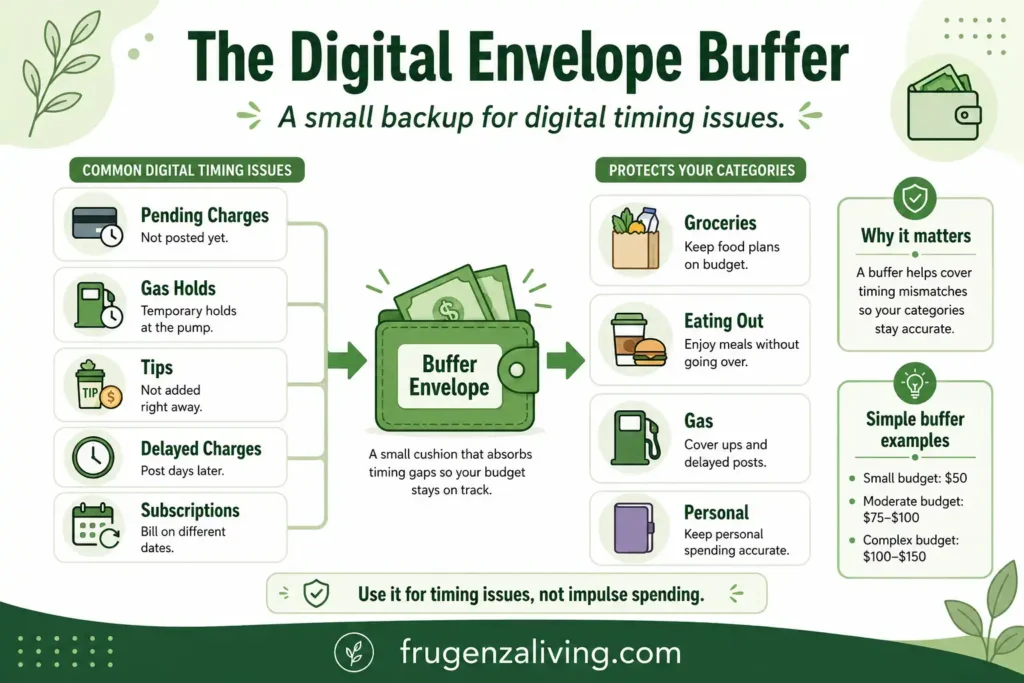
A digital cash envelope budget needs a small buffer.
This is not fun money. It is protection against digital timing problems.
Pending transactions, tips, gas station holds, delayed charges, and subscriptions can make your envelopes look cleaner than reality. A small buffer envelope helps absorb those timing issues.
For example:
- Small budget: $50 buffer
- Moderate budget: $75–$100 buffer
- More complex budget: $100–$150 buffer
The buffer should not become a secret spending category. Use it for transaction mismatch, not impulse purchases.
If your buffer gets used every week, it is not only a buffer problem. It may mean one envelope limit is too low or a recurring charge is missing.
Step 7: Use Digital Sinking Funds for Irregular Costs
Digital envelopes are especially helpful for sinking funds.
A sinking fund is money you set aside slowly for a future expense. Digital envelopes make this easier because the money can stay separate without needing physical cash.
Examples:
- Car maintenance: $25/month
- Gifts: $15/month
- Annual subscriptions: $20/month
- Clothing: $30/month
- Medical costs: $25/month
- Home repairs: $40/month
This is one reason digital envelope budgeting can work better than cash for long-term categories. You can see the money building without keeping envelopes full of cash at home.
When the Delay Rule Does Not Apply — And How to Tell the Difference
The 12–24 hour delay works well for most non-essential digital purchases.
But applying it uniformly to every purchase is where the rule can break down.
Some purchases have genuine time constraints. A medical copay that needs to be submitted within a billing window. A work-related tool required before a deadline. A bill that was missed and now carries a late fee if not paid today.
In these cases, the delay rule does not apply — not because the purchase is more important than the envelope limit, but because waiting does not actually help you make a better decision. The decision is already made by external circumstances.
The problem is that digital commerce has learned to manufacture urgency that looks identical to genuine deadlines.
A countdown timer on a checkout page. A “only 2 left” stock indicator that resets daily. A flash sale ending in four hours on a product that runs sales every other week. A subscription discount that “expires tonight” but appears again next month.
These are designed to activate the same response as a real deadline — time pressure, mild anxiety, the sense that not acting now means losing something. The result is that the delay rule gets bypassed not because there is a genuine constraint, but because the platform simulated one effectively.
Here is one practical way to separate the two.
Ask: Does the urgency exist because of something I have no control over, or because of something the platform decided?
A bill due date exists regardless of whether the company wants your money today. A limited-stock counter that drops by one each time you refresh the page is a design choice.
If the urgency is external — a deadline you did not set and cannot move — apply the envelope check immediately and proceed. The delay rule still applies in the sense that you check the envelope before spending, but the 12–24 hour wait does not add value here.
If the urgency is platform-generated — a timer, a countdown, a “offer ends soon” label — apply the full delay. Most of these offers return. The ones that do not were probably not aligned with the envelope anyway.
This distinction keeps the Card Swipe Delay Rule from being quietly dismantled by the exact spending patterns it was designed to protect against.
Digital Cash Envelope System Example
Let’s say your monthly income assigned is $3,200.
Your digital envelopes might look like this:
- Bills: $1,450
- Groceries: $450
- Gas: $180
- Eating out: $120
- Personal spending: $100
- Sinking funds: $300
- Emergency savings: $200
- Buffer: $75
- Extra debt or savings: $325
Now every dollar has a job.
If eating out hits $120, you do not look at your bank balance and assume you still have money to spend. You check the envelope. If the envelope is empty, you pause, move money intentionally, or wait until the next funding period.
That is the core of the digital cash envelope system: your category balance matters more than your total bank balance.
Do a Digital Envelope Audit After 30 Days
After 30 days, review the system instead of blaming yourself.
Ask:
- Which envelope ran out too quickly?
- Which category had money left?
- Which online purchases were not tracked?
- Did the buffer get used too often?
- Are there too many categories?
- Do bills, flexible spending, and sinking funds feel clearly separated?
This audit helps you make the system easier to keep using. A digital envelope budget should get clearer over time, not more complicated.
Common Mistakes With Digital Envelopes
Avoid these common mistakes:
- Only checking your bank balance: Your bank balance is not your budget.
- Updating too late: Digital envelopes fail when transactions pile up untracked.
- Mixing bills and spending money: Keep must-pay bills separate from flexible spending.
- Skipping a buffer: Pending charges can make your envelopes look more accurate than they are.
- Creating too many categories: Too many digital envelopes can become app clutter.
- Moving money without a reason: Digital transfers should be intentional.
- Ignoring online spending: Digital envelopes must include subscriptions, apps, and online carts.
Digital vs Cash vs Hybrid Envelope System
A cash envelope system uses physical money. It creates strong spending friction because you can see and feel the money leaving.
A digital envelope system is cashless. It works better for debit cards, online shopping, autopay bills, shared budgets, and sinking funds.
A hybrid cash envelope system uses both. You might use cash for problem categories like eating out or personal spending, then digital envelopes for bills, online purchases, and sinking funds.
None of these systems is automatically better. The best one is the one you will actually check before spending.
Final Thoughts: Make Cashless Spending Visible Again
A digital cash envelope system is not about finding the fanciest app.
It is about making cashless spending visible again.
Create clear categories. Limit each envelope. Enter spending quickly. Adjust before overspending. Review weekly. Add a small buffer so pending transactions do not throw off your plan.
Digital envelope budgeting works best when it gives your money a clear job before your card starts spending.
The best digital envelope system is not the one with the most features. It is the one you actually check before spending.
FAQ
What is a digital cash envelope system?
A digital cash envelope system is a cashless budgeting method where you divide your money into digital categories or envelopes. Each envelope has a limit for things like groceries, eating out, bills, sinking funds, and personal spending.
How do digital cash envelopes work?
Digital cash envelopes work by assigning money to categories before you spend. When you make a purchase, you subtract it from the correct digital envelope using an app, bank bucket, spreadsheet, or manual tracker.
Can I use cash envelopes without cash?
Yes. You can use a cash envelope system without cash by creating digital envelopes in a budgeting app, spreadsheet, notes app, or bank account with spending buckets.
What categories should I use for digital envelopes?
Good digital envelope categories include bills, groceries, eating out, gas, personal spending, household items, sinking funds, emergency savings, and planned fun money.
Do I need an app for digital cash envelopes?
No. You can use an app, spreadsheet, bank buckets, separate accounts, or even a notes app. The best tool is the one you can update consistently.
What is the best way to track digital envelopes?
The best way to track digital envelopes is the method you can update consistently. A budgeting app can help with automation, while a spreadsheet or notes app can work well if you prefer manual control.

Read about Jeffi and Frugenza Living
- How to Budget a 10-Month Salary Over 12 Months - October 16, 2026
- Pet Adoption Budget Checklist: What You Still Need to Pay - October 16, 2026
- Proportional Bill Split Calculator for Two Incomes - October 15, 2026